
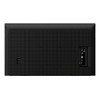

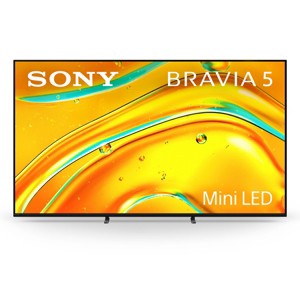
Sony K65XR50 BRAVIA 5 65" Mini LED 4K HDR Google TV
$1,499.99
Out of Stock

Free & easy returns
Return this item by mail or in store within 30 days for a full refund.
Sold & shipped by WORLD WIDE STEREO
Eligible for registries and wish lists
At a glance
About this item
Additional product information and recommendations
Discover more options
- $894.03reg $1,599.99 Sale4.9 out of 5 stars with 8 ratings
- $248.99reg $299.99 Sale
- $1,130.93reg $2,199.00 Sale
- $1,336.93reg $5,999.00 Sale
- $997.99reg $1,149.00 Sale

Frequently bought together
- $229.99 - $269.99reg $519.99 - $704.99 Sale4.3 out of 5 stars with 51 ratings


Guests also viewed
- $359.99 - $429.99reg $379.99 - $499.00 Sale4.7 out of 5 stars with 2173 ratings
- $299.99 - $399.99reg $349.99 - $419.99 Sale4.1 out of 5 stars with 329 ratings
Guests are saying
The Sony Bravia 5 mini LED TV impresses with its vibrant picture quality and user-friendly smart features, making it a great choice for movie lovers and gamers alike. Guests appreciate the deep blacks and rich colors, along with the seamless connectivity options. However, some have experienced issues with the remote control and software stability. Overall, it offers a solid viewing experience, especially for those looking to upgrade their home entertainment setup.
Summary created by AI from text of reviews reflecting recent feedback provided across different star ratings (includes incentivized reviews)
4.3 out of 5 stars with 87 reviews
4 out of 5 stars
6 May, 2026
originally posted on sony.com

Nice picture and sound still getting used it
Got tv2weeks ago still getting used to it nice tv
1 reply from Sony UK team - 12 days ago
Hi, Thank you for your feedback. We are happy to hear that you are enjoying the picture and sound of your K-55XR5, and happy with the quality we always aim to deliver! We hope you continue to enjoy it for years to come! Additionally, we recommend using our online help guide, as it's really comprehensive and thorough, and you can use the search bar in it to learn more about the K-55XR5 settings, features and menu options: https://cutt.ly/VtXNJ4v9 You can also reach the same user guide by pressing the help button on the remote control of the TV. Furthermore, if you need any further assistance, feel free to contact us using this link: https://cutt.ly/heoRCkdW (Please copy and paste the links into your browser) Ismail @Sony Support UK
5 out of 5 stars
24 April, 2026
originally posted on sony.com
Insurance Replacement
The tv was an insurance replacement from a previous Sony which I loved , Hopefully this new one is as good as the last one only time will tell.
5 out of 5 stars
23 April, 2026
originally posted on sony.com
Grate features
I'm happy with my purchase. Very nice tv every one in my family love it.
2 out of 5 stars
20 April, 2026
originally posted on sony.com
Problem software not fit for purpose
The picture and sound were good but the software was terrible I rang Sony and explained the problems on five occasions and we updated the software, one of your staff took over the TV on two occasions And still the problems continued. We then reset the factory settings and still no good We also removed all peripheral equipment which made no difference.
1 reply from Sony UK team - 28 days ago
Hi, Thank you for your feedback. We're happy to hear that you're enjoying the picture and sound quality of your K-55XR5. Yet, we're sorry to learn that you're experiencing software issues with your TV. Please try the steps below and test again: 1. Unplug the TV from the mains and leave it for 1 minute, and then plug it back in. 2. Remove the cached data: Press HOME, then select [Settings] → [Storage and Reset] → [Internal storage] → [Cached data] → then select [Yes]. 3. Connect the TV to another internet source (e.g., mobile hotspot) and test again. Furthermore, if you need any further assistance, please reach out to us using the following link and provide us with your case reference number so that we can check your case further and provide the needed support: https://cutt.ly/heoRCkdW (Please copy and paste the link into your browser). Menna @Sony Support UK
1 out of 5 stars
18 April, 2026
originally posted on sony.com
Disappointed
I have had this TV for about 5 months and have the engineers out 3 times to repair the TV. It had a new mother board last repair and the TV is still malfunctioning. The engineers took it away over a week ago, we are waiting on Sony technical to report back to the engineers. Rely disappointed we are left without a T V.
1 reply from Sony support team team - 30 days ago
Hi, Thank you for your feedback. We are truly sorry to hear about the ongoing issues with your K-65XR5, especially after multiple engineer visits and a motherboard replacement. This is certainly not the experience we aim to provide, as we continuously strive to deliver the best possible quality. Please contact us using the details provided at the following link for assistance. We would be happy to provide the necessary support: https://cutt.ly/heoRCkdW (Copy and paste the link into your browser) Nadine @Sony Support UK
5 out of 5 stars
13 April, 2026
originally posted on sony.com
Love it BUT
I love the TV, it is fast and has great picture. The only negative thing I have is the amount of picture settings. It is sooooo advanced. Should have a basic setup for dummies who don't care about energy saving or soap opera effect.
5 out of 5 stars
11 April, 2026
originally posted on sony.com
Very glad I bought this
Very happy with Bravia 5 TV. Excellent picture and plenty of features.
5 out of 5 stars
10 April, 2026
originally posted on sony.com
Great features and picture perfect.
This tv is amazing, the picture quality and sound are first class, very happy with it.
3 out of 5 stars
3 April, 2026
originally posted on sony.com
Apps Crashes Constantly
All the main apps like Netflix or YouTube crashes constantly and there is no update that fix them. The remote control has buttons for apps that never works.
1 reply from Sony North America Customer Support team - 2 months ago
Hi IsmaelChicago, We are sorry to hear that you are experiencing performance issues with the apps and remote functionality on your BRAVIA 5. This is certainly not the experience we want you to have. To resolve these crashes and connectivity glitches, please try the following troubleshooting steps: 1- Perform a Power Cycle: Unplug the TV power cord from the wall outlet for approximately 2 minutes. Plug it back in and turn the TV on. This performs a soft reset that clears out temporary glitches and refreshes the system memory. 2- Check for System Updates: Ensuring your TV has the latest firmware is vital for app stability. Navigate to: Settings > System > About > System Software Update > Update your TV software. 3- Clear App Data and Cache: If specific apps like Netflix or YouTube are crashing, clearing their stored data can fix the issue: Go to Settings > Apps > [Select the specific app] > Clear data and Clear cache. If these steps do not resolve the issue, we want to help you get your TV back to peak performance. Please contact our dedicated technical support team for further troubleshooting at: https://us.esupport.sony.com/support/s/support-contact?language=en_US&category=tv Thank you for considering Sony! Regards, Dominick
5 out of 5 stars
29 March, 2026
originally posted on sony.com
Great product
Very happy with my new TV great picture, 75 inch looks great on the wall in my new media wall.
2 out of 5 stars
26 March, 2026
originally posted on sony.com
Going back to store
Bought it a week ago not happy with it considering the price wont conect to my blue ray player and tech support usless goes to blank screen when I'm watching programs volume but no picture
1 reply from Sony UK team - 2 months ago
Hi, Thank you for your feedback. We're sorry to hear that you're experiencing a picture issue with your K-55XR5. This is not the experience we aim to provide, as we continuously strive to deliver the best quality possible. Please try the steps at the following link and test again: https://cutt.ly/etAjFHLE If the issue remains, try the steps here: https://cutt.ly/mtAjLiLK Furthermore, if you need any further assistance, please do not hesitate to contact us using the details here: https://cutt.ly/heoRCkdW (Please copy and paste the links into your browser). Menna @Sony Support UK
4 out of 5 stars
25 March, 2026
originally posted on sony.com
A significant upgrade
This TV was an upgrade from a 2018 LED Bravia. After seeing and comparing other brands I was nearly sold on the Bravia 3, but wanted to have a more significant upgrade. I have not been disappointed. The picture quality is extremely impressive and the Google operating system is also very good. One disappointment is the that ITV X still does not have the Live TV option in the app, I’ve since found out this specific to only a few TV brands. I thought this was just because I had an older TV. If that could be resolved, this would have been a 5 star rating with no complaints.
1 reply from Sony UK team - 2 months ago
Hi, Thank you for your feedback. We're happy to hear that you're enjoying your K-55XR5. Yet, we're sorry to learn that you're facing difficulties accessing live TV through the ITVX app. We'd like to highlight that you can reach live TV through the YouView app, or though the TV button on the remote control. Additionally, you can check the following article for the steps on how to access the live TV: https://cutt.ly/LtPj20ZQ Furthermore, if you need any further assistance, please do not hesitate to contact us using the details here: https://cutt.ly/heoRCkdW (Copy and paste the links in your browser). Ismail @Sony Support UK
5 out of 5 stars
17 March, 2026
originally posted on sony.com
Happy Customer
Looks good.Great surround sound. Easy set up with my Sony Bravia TV.
3 out of 5 stars
13 March, 2026
originally posted on sony.com
Need to sacrifice power saving for HD 4K
This Mini LED 4k TV replaced another Sony 26" Std LCD which had lasted aroun 13 years until it delevoped a fault. Getting to grips with the various setting on the new Mini LED is a chore, impossible to get the provided remote to turn on my BT box pro, just dosen't do it (the tv comes with 2 remotes just to confuse things further) Now, as far as 4K is concerned, it is necessary to by-pass any power saving options, as it comes out of the box the picture is no better than the old LCD model. Finally got to an HD picture by changing the settings, each change comes with a warining that the TV will use more power. So yes, it is HD, but don't expect it if yopu are power usage conscious! As for said provided remotes, I don't use them unless I need to change settings, I use the BT Pro Box remote, because this at least turns on TV, BT Box, and my Sony surround system in one go.
1 reply from Sony support team team - 2 months ago
Hi, Thank you for your feedback. We’re sorry to hear that you're experiencing difficulties with your K-65XR5 and that you can't control your BT Pro Box with the provided remote. This is not the norm, as we strive to deliver the best quality possible. You can enable BRAVIA Sync control by following the steps here: https://cutt.ly/BtlAuRSV Please note that the voice remote controller comes with enhanced smart TV functionalities, including voice commands, which can be used to control various aspects of the TV and connected devices using the built-in microphone for voice control and the standard remote control includes essential buttons and more functions. You can learn more here: https://cutt.ly/htvdFyIN You can also find more about the functions of the remote controllers by following this link: https://cutt.ly/kr3e8F9j Regarding the picture quality, you can learn more about how to adjust the picture settings to match your preferences by following the steps at this link: https://cutt.ly/mtfcn5iR Additionally, you can turn off Power Saving by following the steps here: https://cutt.ly/KtY22y2b If you need any further assistance, do not hesitate to contact us using the details provided in the following link: https://cutt.ly/heoRCkdW (Copy and paste the link into your browser) Nadine @Sony Support UK
1 out of 5 stars
8 March, 2026
originally posted on sony.com
Not good
I have to say that I have had this tv months now but to be honest it as been a load off rubbish I have been able to get in touch with you as I have had a load of problems with my body as in surgery two in chest one in forehead when I am up to it I will be in touch so please keep this to hand.TED SIMMONS THANK YOU.
1 reply from Sony UK team - 2 months ago
Hi, Thank you for your feedback. We're sorry to hear that the K-75XR5 didn't meet your expectations. This is not the experience we aim to provide, as we continuously strive to deliver the best quality possible. And we hope you get well soon. Additionally, you can try the basic troubleshooting steps below, as they could help you with the issue: 1. Disconnect all externals (e.g., TV box, Ariel cable, HDMI cables, USB, etc.). 2. Unplug the TV from the mains and leave it for 1 minute, and then plug it back in. 3. Make sure the software is updated using this link: https://cutt.ly/UtTOfQmr 4. Remove the cached data: Press HOME, then select [Settings] → [Storage and Reset] → [Internal storage] → [Cached data] → then select [Yes]. 5. Connect the TV to another internet source (e.g., mobile hotspot) and test again. 6. In case the issue persists, perform a factory data reset by following the steps here: https://cutt.ly/otTOghKq Furthermore, if any further assistance is needed, you can contact us using this link: https://cutt.ly/heoRCkdW (Copy and paste the links in your browser). Menna @Sony Support UK
5 out of 5 stars
8 March, 2026
originally posted on sony.com
Exactly what it was described
Just purchased this TV have had a sony bravia for 8 years so it's in the spare room and the new bravia is in the living room..this is outstanding tv.
5 out of 5 stars
1 March, 2026
originally posted on sony.com
Beautiful picture quality
The colours and sharpness are outstanding ..and quality
5 out of 5 stars
1 March, 2026
originally posted on sony.com
Happy CJ
Recently bought a new Sony to replace an old one that broke down. This is a good replacement as I love Sony
5 out of 5 stars
26 February, 2026
originally posted on sony.com
Amazing Sony Bravia 5
This was a random purchase We were in need of my new TV and I decided to go and have a look . I was blown away by the colour definition and s Tessa ounds of the Sony Bravia range. There were many Models to choose from, I chose the Sony Bravia five as I wanted a 65 inch television And it was in my budget . It Fits perfectly on my living room wall Where I had A smaller Television . The Sony Bravia five Has many of the models above features Which allowed me to dip my toes into the world of Sony . I am super pleased And I'm looking to change my other TV to Sony Bravia
4 out of 5 stars
22 February, 2026
originally posted on sony.com
Great picture!
I am happy with my choice, great picture quality. Sound is not as good as the picture and that's why I gave it only 4 stars.
1 reply from Sony support team team - 3 months ago
Hi, Thank you for your feedback. We’re happy to hear that you're enjoying the picture quality of your K-55XR5. Yet, we're sorry to hear that the sound quality didn't meet your expectations. This is not the norm, as we strive to deliver the best quality possible. To have the optimum experience, you can configure various settings related to the TV’s sound, such as sound quality and sound mode here: https://cutt.ly/wtqegwWS If you need any further assistance, do not hesitate to contact us using the details provided in the following link: https://cutt.ly/heoRCkdW (Copy and paste the link into your browser) Nadine @Sony Support UK