Target New ArrivalsGift Ideas for DadClothing, Shoes & AccessoriesHome & DecorKitchen & DiningOutdoor Living & GardenGroceryHousehold EssentialsBabyBeautyPersonal CareSports & OutdoorsHealthWellnessLuggageSchool & Office SuppliesToysElectronicsVideo GamesMovies, Music & BooksParty SuppliesGift IdeasGift CardsPetsUlta Beauty at TargetShop by CommunityTarget OpticalDealsClearanceNew ArrivalsGift Ideas for DadBack to SchoolCollegeTop DealsTarget Circle DealsWeekly AdShop Order PickupShop Same Day DeliveryRegistryRedCardTarget CircleFind Stores
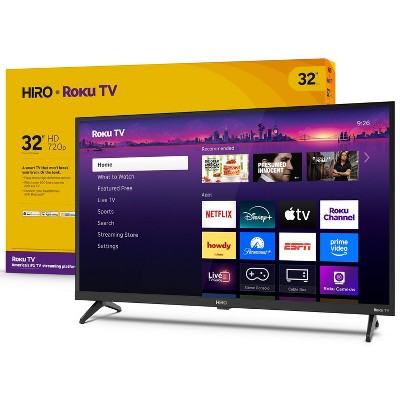
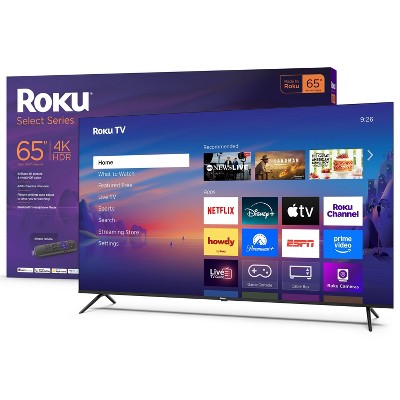
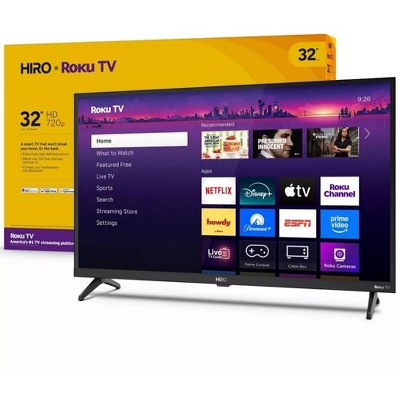
Roku 32" Select Series 720p HD Smart Roku TV with Roku TV Remote - 2 of 4Roku 32" Select Series 720p HD Smart Roku TV with Roku TV Remote - 3 of 4Roku 32" Select Series 720p HD Smart Roku TV with Roku TV Remote - 4 of 4
Roku 32" Select Series 720p HD Smart Roku TV with Roku TV Remote - 1 of 4

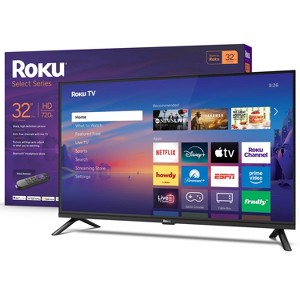
Roku 32" Select Series 720p HD Smart Roku TV with Roku TV Remote

$129.99 reg $149.99
Sale save $20.00 (13% off)

In Stock

Eligible for registries and wish lists

At a glance

About this item

Highlights

  • Seamless streaming: With fast Wi-Fi and apps that launch in a snap, Roku Select Series TVs get you to your entertainment quickly. Our intuitive interface makes exploring popular apps—plus free movies, shows, and live TV—as easy as it is fun.
  • Explore a world's worth of TV: Dive into all kinds of entertainment and easily find your favorites or soon-to-be favorites.
  • A ton of entertainment at the best price—free: Your go-to streaming destination for free entertainment, Roku has 500+ TV channels, with live in-season shows, hit movies, weather, local news, and award-winning Roku Originals.
  • Home sweet home screen: Move apps around and make the Roku experience your own with a home screen that easily gets you to what you want to watch fast.
  • Just keeps getting better: Get the newest apps, features, and more with automatic software updates.
  • A perfect fit for any smart home: Enjoy easy voice control with Roku Voice, Siri, Alexa, or Google Assistant. Effortlessly share videos, photos, music, and more from your Apple devices to your smart TV with Apple AirPlay.
  • Bright, clear picture: Bring entertainment to life on our 32” flat screen TV with bright 720p HD—perfect for bedrooms, kitchens, and beyond. Roku Smart Picture cleans up incoming TV signals, optimizes them, and chooses the right picture mode.

Description

A smart TV that makes sense. Roku Select Series HD TVs are designed for a delightful entertainment experience. Enjoy your streaming favorites in bright HD and catch every word with auto speech clarity and night mode. Watch free live television right from the home screen, or use the remote’s pre-set shortcut buttons to quickly launch popular apps. It’s the perfect flat screen TV for bedrooms, living rooms, kitchens, or kids’ rooms. Smart TV doesn’t have to be complicated. That’s why we’ve designed a line of flat screen smart TVs powered by the delightfully simple Roku experience.

Dimensions (Overall): 16.8 Inches (H) x 28.2 Inches (W) x 3.3 Inches (D)
Weight: 7.6 Pounds
Electronics Condition: New
Electronics Features: Sleep Timer, Streaming Capability, ROKU Voice Assistant Built-In, Wi-Fi, Tv Apps, Smart TV, Built-In ROKU Streaming
Aspect Ratio: 16:9 Aspect Ratio
Screen Resolution: 720p
Native screen refresh rate: 60 Hz
Wireless Technology: Wi-Fi
Screen Size: 32 Inches
Stand Depth: 7.1 Inches
Industry or Government Certifications: No Certifications
Stand Width: 25.3 Inches
Compatible With: Google Assistant, Netflix, Paramount+, Max, Amazon Prime Video, FuboTV, Alexa, YouTube TV, Hulu with Live TV, Disney+, Sling TV, Peacock, Apple TV+
VESA Mounting Standard: 200x200
Product Depth with Stand: 7.1 Inches
Product Height with Stand: 18.3 Inches
Product Width with Stand: 28.2 Inches
Backlight type: LED Direct Lit
Smart platform: Roku
Voice assistant built-in: No Voice Assistant Built-In
Number of HDMI ports: 3
High Dynamic Range (HDR): No HDR
Screen Mirroring Technology: Apple Airplay
Battery: 2 AAA Alkaline, Required, Not Included
Warranty: 1 Year Limited Warranty. To obtain a copy of the manufacturer's or supplier's warranty for this item prior to purchasing the item, please call Target Guest Services at 1-800-591-3869
TCIN: 90471878
UPC: 829610009452
Item Number (DPCI): 008-09-0159
Origin: Imported
Energy Guide Label Required:
ENERGYGUIDE LABEL REQUIRED
If the item details aren’t accurate or complete, we want to know about it.

Shipping details

Estimated ship dimensions: 4.3 inches length x 31.5 inches width x 19.5 inches height
Estimated ship weight: 10.4 pounds
This item ships in its manufacturer’s packaging, revealing what’s inside. ·

Return details

This item can be returned to any Target store or Target.com.
This item must be returned within 30 days of the date it was purchased in store, delivered to the guest, delivered by a Shipt shopper, or picked up by the guest.
See the return policy for complete information.

Q: The legs to my tv are super wobbly. The screws are as tight as they will go. Anyone else have this issue or any suggestions? The tv keeps flopping forward and I’m afraid it’s going to fall off the dresser.

submitted by Lisa M - 5 months ago
  • A: I did that and it was difficult but it worked. I'd choose another TV next time

    submitted bylz - 4 months ago
  • A: Hello Lisa M,The design of these "feet" can be deceptive—even when the screws feel tight, the legs can stay loose because of how the plastic screw holes are manufactured.The Fix: Take the legs off completely. Screw the screws directly into the bottom of the TV without the legs. The Goal: You want the screw to go all the way in until it hits a "hard stop." This pre-cuts the path. Once you've done this, take the screws back out, put the legs on, and screw them back in. They should now seat deeply enough to hold the legs firm.

    submitted byRoku Support - 5 months ago
    Brand expert
  • A: Hi, thanks for reaching out about the Roku 32" Select Series 720p HD Smart Roku TV with Roku TV Remote The design of these "feet" can be deceptive—even when the screws feel tight, the legs can stay loose because of how the plastic screw holes are manufactured.The Fix: Take the legs off completely. Screw the screws directly into the bottom of the TV without the legs. The Goal: You want the screw to go all the way in until it hits a "hard stop." This pre-cuts the path. Once you've done this, take the screws back out, put the legs on, and screw them back in. They should now seat deeply enough to hold the legs firm. If you have any additional questions, we welcome you to contact MyTGTtech at 833-848-8324 every day between 7 am and 11 pm CST.

    submitted byRena - 5 months ago
    Target expert support

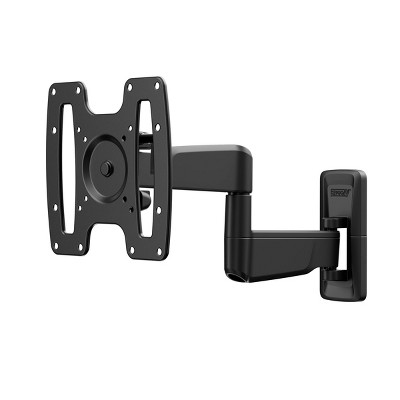
Q: May this tv be mounted to wall mount

submitted by Candy - 5 months ago
  • A: Hello Candy, Yes this model features standard VESA mounting and can be mounted using any universal mount that fits this size of TV.

    submitted byRoku Support - 5 months ago
    Brand expert
  • A: We have tried 3 mounts and none of them were great. You can always see the mount hardware sticking out.

    submitted byKB - 4 months ago
  • A: Hi, thanks for reaching out about Roku 32" Select Series 720p HD Smart Roku TV with Roku TV Remote Yes, this TV supports the 200x200 VESA mounting standard. If you have any additional questions, we welcome you to contact MyTGTtech at 833-848-8324 every day, between 7am-11pm CST.

    submitted byJustin - 5 months ago
    Target expert support

Q: does this tv have a voice roku remote?

submitted by EC - 6 months ago
  • A: Hello EC, No this model comes with a simple remote.

    submitted byRoku Support - 6 months ago
    Brand expert
  • A: Hi, thanks for reaching out about Roku 32" Select Series 720p HD Smart Roku TV with Roku TV Remote Yes, this TV does come with a Roku voice remote. If you have any additional questions, we welcome you to contact MyTGTtech at 833-848-8324 every day, between 7am-11pm CST.

    submitted byMike - 6 months ago
    Target expert support

Q: Is this tv have programable auto tv on/off

submitted by Sizes - 7 months ago
  • A: Hello Sizes, This model does feature a sleep timer to turn off automatically but does not have a feature to turn on automatically.

    submitted byRoku Support - 7 months ago
    Brand expert
  • A: Hi, thanks for reaching out about Roku 32" Select Series 720p HD Smart Roku TV with Roku TV Remote No, the standard Roku 32" Select Series TV does not have programmable on/off buttons on its included remote. However, you can achieve this functionality by enabling HDMI-CEC in both your TV and Roku settings, which allows the Roku remote to power on/off the TV, or by using the more advanced, separately sold Roku Voice Remote Pro, which has programmable shortcut buttons. If you have any additional questions, we welcome you to contact MyTGTtech at 833-848-8324 every day, between 7am-11pm CST.

    submitted byJustin - 7 months ago
    Target expert support

Q: what type of connector does this TV have? USB-C? something else?

submitted by Michael DH - 27 days ago
  • A: Hello Michael, this model does not have usb-c but does have a usb port.

    submitted byRoku Support - 24 days ago
    Brand expert
  • A: Hi, thanks for reaching out about Roku 32" Select Series 720p HD Smart Roku TV with Roku TV Remote. ❌ No USB‑C. The Roku 32" Select Series 720p HD Smart Roku TV uses standard TV connectors, not USB‑C. If you have any additional questions, we welcome you to contact MyTGTtech at 833-848-8324 every day, between 7am-11pm CST.

    submitted byJoe - 27 days ago
    Target staff support

Q: Can I turn the screen off and still have the audio play?

submitted by Billy - 29 days ago
  • A: Hello Billy, No, this TV does not support turning the screen off while keeping audio playing. If you turn the screen off (such as putting the TV to sleep or powering it down), the audio will stop as well. Some Roku TVs offer a Screen Off / Power Saver option during music apps or casting, but this is app‑dependent and not a universal feature across all content.

    submitted byRoku Support - 24 days ago
    Brand expert
  • A: Hi, thanks for reaching out about the Roku 32" Select Series 720p HD Smart Roku TV with Roku TV Remote No, this TV does not support turning the screen off while keeping audio playing. If you turn the screen off (such as putting the TV to sleep or powering it down), the audio will stop as well. Some Roku TVs offer a Screen Off / Power Saver option during music apps or casting, but this is app‑dependent and not a universal feature across all content. If you have any additional questions, we welcome you to contact MyTGTtech at 833-848-8324 every day, between 7am-11pm CST.

    submitted byMike - 27 days ago
    Target expert support

Q: What are the speaker like

submitted by Tray - 1 month ago
  • A: Hello Tray, firing, 2-channel built-in speakers with Dolby Audio, designed to prioritize clear speech and dialogue in small-to-medium rooms. While adequate for casual viewing with, the speakers offer limited bass and depth, making a soundbar upgrade recommended for a more immersive cinematic experience.

    submitted byRoku Support - 24 days ago
    Brand expert
  • A: Hi, thank you for reaching out about Roku 32" Select Series 720p HD Smart Roku TV with Roku TV Remote. The 32" Roku Select Series 720p TV features down-firing, 2-channel built-in speakers with Dolby Audio, designed to prioritize clear speech and dialogue in small-to-medium rooms. While adequate for casual viewing with, the speakers offer limited bass and depth, making a soundbar upgrade recommended for a more immersive cinematic experience. If you have any additional questions, we welcome you to contact MyTGTtech at 833-848-8324 every day, between 7am-11pm CST.

    submitted byMatt - 1 month ago
    Target expert support

Q: free local channels?

submitted by dbean - 1 month ago
  • A: Hello Dbean, thanks for reaching out about Roku 32" Select Series 720p HD Smart Roku TV with Roku TV Remote Yes, the Roku 32" Select Series 720p HD Smart TV offers free local channels primarily by connecting a digital HDTV antenna to its built-in tuner. It also provides over 500+ free, live streaming channels via The Roku Channel and various local news apps.

    submitted byRoku Support - 24 days ago
    Brand expert
  • A: Hi, thanks for reaching out about Roku 32" Select Series 720p HD Smart Roku TV with Roku TV Remote Yes, the Roku 32" Select Series 720p HD Smart TV offers free local channels primarily by connecting a digital HDTV antenna to its built-in tuner. It also provides over 500+ free, live streaming channels via The Roku Channel and various local news apps. If you have any additional questions, we welcome you to contact MyTGTtech at 833-848-8324 every day, between 7am-11pm CST.

    submitted byJustin - 1 month ago
    Target expert support

Q: Can this TV connect my wireless Internet? 

submitted by Gma - 1 month ago
  • A: Hello GMA, Yes, this TV can connect to your Wi-Fi internet providing access to streaming apps and MUCH more.

    submitted byRoku Support - 24 days ago
    Brand expert
  • A: Hi, thanks for reaching out about Roku 32" Select Series 720p HD Smart Roku TV with Roku TV Remote Yes, this TV can connect to your Wi-Fi internet providing access to streaming apps and MUCH more. If you have any additional questions, we welcome you to contact MyTGTtech at 833-848-8324 every day, between 7am-11pm CST.

    submitted byMike - 1 month ago
    Target expert support

Q: Can you watch over the air TV on this device?

submitted by Trixie - 2 months ago
  • A: Hello Trixie, yes you sure can with an antenna. Roku also offers 500+ free live tv channels on the Roku channel.

    submitted byRoku Support - 24 days ago
    Brand expert
  • A: Hi, thanks for reaching out about Roku 32" Select Series 720p HD Smart Roku TV with Roku TV Remote Yes ✅ — you can watch over‑the‑air (antenna) TV on this Roku TV. This Roku Smart Roku TV has a built‑in ATSC digital TV tuner, which means you can connect an HD antenna (indoor or outdoor) and watch free local broadcast channels (ABC, CBS, NBC, FOX, PBS, etc.) All you will need is the TV, an HD Antenna, and to connect the antenna to the ANT/Cable (coax) input on the back of the TV If you have any additional questions, we welcome you to contact MyTGTtech at 833-848-8324 every day, between 7am-11pm CST.

    submitted byMike - 2 months ago
    Target expert support
WARNING: This product can expose you to chemicals including styrene which is known to the state of California to cause cancer, and bisphenol A which is known to the state of California to cause birth defects or other reproductive harm. For more information, go to www.P65Warnings.ca.gov For more information, go to https://www.p65warnings.ca.gov/

Additional product information and recommendations

Discover more options

Guests also viewed

4.4 out of 5 stars with 510 reviews
black levels: 4.16 out of 5
brightness: 4.24 out of 5
color quality: 4.26 out of 5
features: 4.14 out of 5
sound quality: 4.08 out of 5
60% would recommend
63 recommendations
5 out of 5 stars
23 May, 2026
originally posted on roku.com
Image

(no review title)

Love it. Easy to program and we'll priced. Fits well ok our kitchen cabinet. No complaints.
Cathy B
Did you find this review helpful?
5 out of 5 stars
23 May, 2026
originally posted on roku.com
Image

Great value

Bought this to use in a small kitchen at it works perfectly fits easily and the picture is great. A very good value if you want a small TV.
Perry G
Did you find this review helpful?
5 out of 5 stars
18 May, 2026Verified purchase

(no review title)

Just want I needed
Jarrod
1 guest found this review helpful. Did you?
5 out of 5 stars
Thumbs up graphic, would recommend
9 May, 2026Verified purchase

Decent tv for price

Haven’t had any issues with this tv seems to be great so far, we don’t use it every single day but has been great so far.
Atown
black levels: 5 out of 5
brightness: 5 out of 5
color quality: 5 out of 5
features: 5 out of 5
sound quality: 5 out of 5
1 guest found this review helpful. Did you?
1 out of 5 stars
Thumbs down graphic, would not recommend
3 May, 2026Verified purchase

(no review title)

Product stopped working after 4 months. Target said return was not possible as it was out of the window. Directed me to Roku who were completely useless. It’s a shame as it was a gift that stopped working after 4 months of occasional use.
1 reply from Roku Support team - 21 days ago
Hi Jasmine! We're sorry to hear about your experience, and thanks for sharing. Have you had a chance to contact our customer support team? We'd be happy to learn more and help troubleshoot this with you! Visit us online at support.roku.com/contactus to get started and connect with an agent. Your feedback is very important to us, and we’re eager to assist! Jessica, Roku Customer Advocate
Jasmine
Did you find this review helpful?
5 out of 5 stars
2 May, 2026Verified purchase

(no review title)

Perfect
Gegly
Did you find this review helpful?
1 out of 5 stars
26 April, 2026

Roku tv

Tv does not work missing pieces
1 reply from Roku Support team - 29 days ago
Hi Jasmine, help has arrived! Please visit us online at support.roku.com/contactus to connect with an agent who can assist. Your feedback is very important to u, and we’re eager to assist. Thank you! Bernie, Roku Customer Advocate
Jasmine
Did you find this review helpful?
5 out of 5 stars
Thumbs up graphic, would recommend
22 April, 2026Verified purchase

(no review title)

good everything
rachelle
black levels: 5 out of 5
brightness: 5 out of 5
color quality: 5 out of 5
features: 5 out of 5
sound quality: 5 out of 5
Did you find this review helpful?
5 out of 5 stars
18 April, 2026

(no review title)

I just got this tv 📺 today was not hard to setup i hope it works wonderful for me because my other tv broke
Jennifer
1 guest found this review helpful. Did you?
5 out of 5 stars
Thumbs up graphic, would recommend
10 April, 2026Verified purchase

(no review title)

I really liked it
Grace
brightness: 5 out of 5
color quality: 5 out of 5
features: 5 out of 5
sound quality: 5 out of 5
1 guest found this review helpful. Did you?
3 out of 5 stars
Thumbs up graphic, would recommend
10 April, 2026Verified purchase

good tv

has one little pixel out but rest is great
1 reply from Roku Support team - 2 months ago
Thanks for letting us know, Kim! If the pixel stays stuck or unresponsive, try restarting your TV and checking for any available software updates by going to Home > Settings > System > Software update > Check now. If the issue continues, please reach out to our support team at http://support.roku.com/contactus so we can take a closer look and explore your options. Thanks again! Jessica, Roku Customer Advocate
Kim
black levels: 4 out of 5
brightness: 4 out of 5
color quality: 4 out of 5
features: 4 out of 5
sound quality: 4 out of 5
Did you find this review helpful?
5 out of 5 stars
Thumbs up graphic, would recommend
2 April, 2026Verified purchase

(no review title)

Easy to set up and use. Love Roku.
Michele
black levels: 5 out of 5
brightness: 5 out of 5
color quality: 5 out of 5
features: 5 out of 5
sound quality: 5 out of 5
Did you find this review helpful?
5 out of 5 stars
2 April, 2026
originally posted on roku.com
Image

(no review title)

I love RoKu!!!!!!!!!!!!!!!!!!!!!!!!!!!!!!!!!!!!!!!
Nicola W
2 guests found this review helpful. Did you?
1 out of 5 stars
31 March, 2026Verified purchase

(no review title)

I've returned a malfunctioning tv and I am waiting for the one that replaces it.
1 reply from Roku Support team - 2 months ago
Hi Oreste, we’re truly sorry to hear about the condition in which your TV arrived. Since the purchase and shipping were handled by the retailer, our visibility into that part of the process is limited. However, we’re glad to hear that they’ve already arranged a replacement for you. We look forward to hearing about your experience with your new TV once you have it set up at home. Thank you for taking the time to share your feedback with us, and Happy Streaming! Elmer, Roku Customer Advocate
Oreste
black levels: 5 out of 5
brightness: 5 out of 5
color quality: 5 out of 5
features: 5 out of 5
sound quality: 5 out of 5
Did you find this review helpful?
4 out of 5 stars
Thumbs up graphic, would recommend
23 March, 2026Verified purchase

(no review title)

It works great most times but sometimes it glitches.
Simran
black levels: 5 out of 5
brightness: 5 out of 5
color quality: 5 out of 5
features: 5 out of 5
sound quality: 5 out of 5
1 guest found this review helpful. Did you?
1 out of 5 stars
Thumbs down graphic, would not recommend
23 March, 2026Verified purchase

Worst TV Ive Ever Had

This tv is the WORST one I’ve ever had. A week after buying it started freezing, it would randomly exit Disney plus or whatever app we were in and go back to the home screen. I thought maybe it just needed a reboot so I gave it time. Nope here we are now only 1 year later and it gets worse and worse where I can’t even return it because it’s passed the window. No wonder why it’s on sale for $99. Because it’ll last you a couple months lol
1 reply from Roku Support team - 2 months ago
Hi Ally, thank you for sharing your experience with us. For a quick fix, it is imperative to ensure that your device is operating on the latest software version. This will significantly enhance its functionality and provide access to the most recent features. To verify, navigate to Home > Settings > System > Software Update > Check Now. Additionally, reinstallation of the affected channel is recommended. Moreover, it is essential to ascertain the stability of your Wi-Fi connection to enable uninterrupted streaming. For further guidance, please refer to the following link: https://support.roku.com/article/208755548#section-0. If none of these suggestions work, please contact a member of our team so that we can assist you directly at support.roku.com/contactus. Thank you! Elmer, Roku Customer Advocate
Ally
black levels: 1 out of 5
brightness: 1 out of 5
color quality: 1 out of 5
features: 1 out of 5
sound quality: 1 out of 5
3 guests found this review helpful. Did you?
5 out of 5 stars
Thumbs up graphic, would recommend
15 March, 2026Verified purchase

(no review title)

I love it. Clear picture, easy to set up, clear instructions. Great price! Ordered it at night and picked it up the next morning.
Gail
black levels: 5 out of 5
brightness: 5 out of 5
color quality: 5 out of 5
features: 5 out of 5
sound quality: 5 out of 5
4 guests found this review helpful. Did you?
5 out of 5 stars
Thumbs up graphic, would recommend
13 March, 2026Verified purchase

Roku TV Gift

Gift for family member. They are enjoying the ease of logging into their Roku account to watch their favorite shows without additional equipment. Great price and value.
JavaMom
black levels: 5 out of 5
brightness: 5 out of 5
color quality: 5 out of 5
features: 5 out of 5
sound quality: 5 out of 5
2 guests found this review helpful. Did you?
1 out of 5 stars
Thumbs down graphic, would not recommend
12 March, 2026Verified purchase

Keep looking!

This tv is awful! First there’s the issue with the tv stand legs you have to do a work around on then after all that the tv actually stopped working! It worked for a week then it dimly showed the words Roku a few times then stopped working altogether! Do not buy!
1 reply from Roku Support team - 2 months ago
Hi Vanessa, thanks for sharing. Have you had a chance to contact our customer support team? We'd be happy to learn more and help troubleshoot this with you! Visit us online at support.roku.com/contactus to get started and connect with an agent. Your feedback is very important to us, and we’re eager to assist. Thanks! Jessica, Roku Customer Advocate
Vanessa
black levels: 1 out of 5
brightness: 1 out of 5
color quality: 1 out of 5
features: 1 out of 5
sound quality: 1 out of 5
2 guests found this review helpful. Did you?
1 out of 5 stars
Thumbs down graphic, would not recommend
11 March, 2026Verified purchase

(no review title)

haven't even had it a week and it's already having issues. The remote most of the time doesn't sync with the TV so makes it impossible to use most of the time. even tried the Roku app remote and nothing so I just get stuck on watching something when I'm trying to change it.
1 reply from Roku Support team - 2 months ago
Hi Jace, thank you for sharing. For a quick tip, it is essential to ensure that your device is operating on the latest software version. This will significantly enhance its functionality and provide access to the most recent features. To verify, navigate to Home > Settings > System > Software Update > Check Now. Additionally, Roku remotes can sometimes unpair from their devices due to power issues, Wi-Fi problems, or random glitches. First, check that your batteries are aligned correctly and that there is no debris blocking the path. You can also try resetting the remote, which may resolve the issue. For further guidance, please refer to this article: https://support.roku.com/article/21306145024535#section-2. If you need additional assistance, please let us know at support.roku.com/contactus. Thank you! Elmer, Roku Customer Advocate
Jace
1 guest found this review helpful. Did you?

Get top deals, latest trends, and more.

Privacy policy