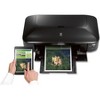
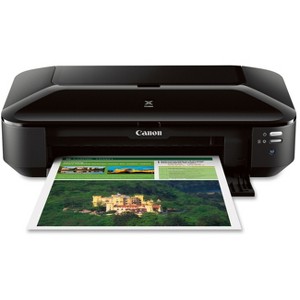
Canon PIXMA iX6820 Desktop Inkjet Printer - Color - 9600 x 2400 dpi Print - 150 Sheets Input - Ethernet - Wireless LAN - Photo Print - Ethernet - USB
$265.99
Out of Stock

Free & easy returns
Return this item by mail or in store within 30 days for a full refund.
Sold & shipped by antonline
Eligible for registries and wish lists
About this item
Additional product information and recommendations
Related Categories
Discover more options
- $139.99reg $249.99 Sale3.9 out of 5 stars with 161 ratings





Frequently bought together
- $10.49 - $16.49reg $13.99 - $21.99 Sale
- $11.49 - $23.49reg $15.39 - $31.39 Sale
Guests also viewed




Guests are saying
The Canon Pixma IX6820 printer is a versatile option for guests seeking high-quality prints, especially for larger formats. Many guests appreciate its ability to handle various paper types and sizes, producing excellent photo quality. While some have experienced connectivity issues and setup challenges, the overall print quality and affordability of ink cartridges make it a worthwhile investment for both personal and professional use. Guests recommend it for art prints, crafts, and business needs.
Summary created by AI from text of reviews reflecting recent feedback provided across different star ratings (includes incentivized reviews)
3.5 out of 5 stars with 88 reviews
1 out of 5 stars
30 March, 2025
originally posted on usa.canon.com

13x19
I have owned 3 now ,on the average 1 1/2 years of work before i have had to Buy another, Moving on to another Brand
5 out of 5 stars
17 November, 2024
originally posted on usa.canon.com
Great prints at a great price!
We were looking for an affordable option for home printing our art prints. After trying quite a few paper options it would be safe to say that this printer is well worth owning! It was quite easy to set up and has produced stellar prints! Some suggestions would be to lighten any image a bit before printing because we have seen a bit of darkening in our prints. Also to be safe it would be advisable to leave a healthy boarder around any image in order to insure it isn’t cut off. Minor issues compared to the quality of prints at hand with this printer. And once set up the ease of printing is amazing! We love it!
5 out of 5 stars
12 November, 2024
originally posted on usa.canon.com
Best Printer ever
We recently purchased this model for a second time. Not because the first one was malfunctioning but because we wanted to have a back up should we need one. I am so happy with my printer and ink cartridge refills are so affordable. Well Worth the money
1 out of 5 stars
31 October, 2024
originally posted on usa.canon.com
Bad Printer
Do not buy this printer. This is the fourth cannon ink jet printer that I have owned in the last 10 years. The Printer will not connect to WIFI. It connected once after hours of trying. Now after a password change it will not connect. There is no screen on this printer and the interface with a PC does not work correctly. It is poorly engineered and is defective. This printer is not as good as previous models that I have purchased. Bad Printer!
2 out of 5 stars
6 March, 2024
originally posted on usa.canon.com
Prints very small
The printer works as expected but it only prints very small type face. I have to reset it every time I print anything
1 out of 5 stars
4 January, 2024
originally posted on usa.canon.com
difficult cableless setup
absolutely horrific when trying to connect with wifi
3 out of 5 stars
4 December, 2023
originally posted on usa.canon.com
Seem ok. But setup is really bad.
Wow was this a pain to set up. Don't bother to set up without a USB cable. You can configure for wireless using the USB to set up. Requires a password which is your serial number on the back of the printer. Also, I needed to set up manually to allow for the SSID password. You can also connect using network cable instead of wireless. The setup software looks like it was developed in the 80s. Terrible software for setting up. Will update with print related issues.
1 out of 5 stars
20 November, 2023
originally posted on usa.canon.com
not worth it
hard to work with no buttons on the printer itself. Hard to clean white lines on my printed papers
5 out of 5 stars
15 November, 2023
originally posted on usa.canon.com
Great Printer
I own a small tshirt business and use this printer for sublimation. I give this printer a 5 star. I bought mine in 2019 and it still works amazing. First canon printer I've owned. Highly recommend.
3 out of 5 stars
28 July, 2023
originally posted on usa.canon.com
Low cost printer
Basic printer, no bells and whistles. Good print quality but louder than expected
1 out of 5 stars
8 June, 2023
originally posted on usa.canon.com
Not great unless you like wasting money with Canon
Owned this for about a year before it stopped printing and just flashes its lights. Read the troubleshooting guide and it is not helpful with my issue at all. Fresh ink installed, and still will not print.
1 out of 5 stars
15 February, 2023
originally posted on usa.canon.com
broke after 2 years
this is the second one of these I have bought. I like everything about it except they break after a couple years.
1 out of 5 stars
14 February, 2023
originally posted on usa.canon.com
PIXMA iX6820 Printer
I bought the PII bought the PIXMA iX6820 printer a few months ago for my edible desserts and I regret it. It printed the first five sheets great but then any prints that have black come out in a dark blue. I replaced the black ink cartridge and the cartridge holder hoping that would fix but it's still the same thing. Wish I had my old MG6620, way better then this printer.
1 out of 5 stars
19 January, 2023
originally posted on usa.canon.com
Horrible Edible Printer
I have bought two of these printers in the last year for my cake business and they both start streaking or the colors clog after a few uses.
1 out of 5 stars
5 October, 2022
originally posted on usa.canon.com
Canon iX6820 B200 ERROR
So disappointed! The printer randomly stopped working. Never buying another Canon product!
1 out of 5 stars
25 June, 2022
originally posted on usa.canon.com
It Won’t Print
I have had this printer less than a year. I use it twice successfully, but now it will no longer print. It says there is a paper jam, but there is no jam. I have spent hours trying to get thing to work. Don’t waste your money on it.
5 out of 5 stars
8 June, 2022
originally posted on usa.canon.com
Works well for stickers
The IX6820 is working well. I primarily purchased it to create sticker version of my artwork. I will move on to art prints later.
5 out of 5 stars
10 May, 2022
originally posted on usa.canon.com
Solid, reliable printer
Our office has used these Canon Pixma ix6820 models for several years. We do hundreds of color prints per week for various projects and pitches. This model performs way better than the newer models. Sometimes they are hard to connect to WIFI, so we just wire them. But the WIFI will work eventually.
5 out of 5 stars
18 March, 2022
originally posted on usa.canon.com
Crisp photo quality
I’m an artist and I print and sell my own prints- the photo quality of this printer is excellent. I strongly disagree with many of these reviews. If you are having issues with print quality consider upgrading the paper. This thing is STURDY I mean I accidentally fed my printer like 20 paper clips by accident once and she’s still going strong. The only issue I’ve had with wireless printing was that occasionally the printer reads as busy when it’s not. When that happens I just switch devices and it usually works just fine. I’ve had this issue with other printers in the past so it’s whatever. It doesn’t do double sided printing (you gotta flip the paper manually) so I more so recommend it for photo printing rather than for office work and stuff like that.
4 out of 5 stars
27 January, 2022
originally posted on usa.canon.com
Pixma iX6820
Four stars because I haven’t used it much yet. I bought it for the larger size capabilities and it had good reviews as a craft printer. This is my first Canon printer. I have always had Epsons, but have had issues with them when printing on card stock. So far this Canon pixma printer is doing everything I want it to do.