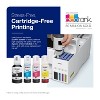


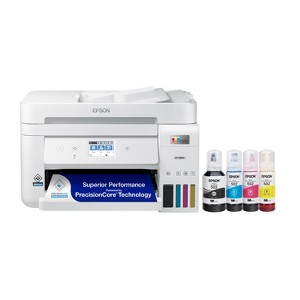
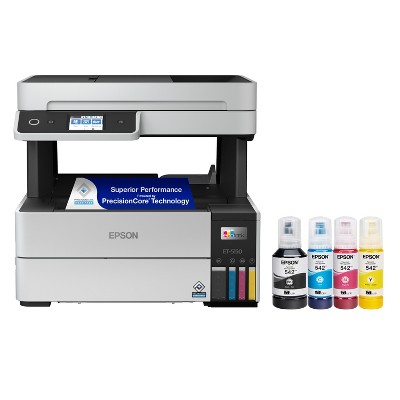
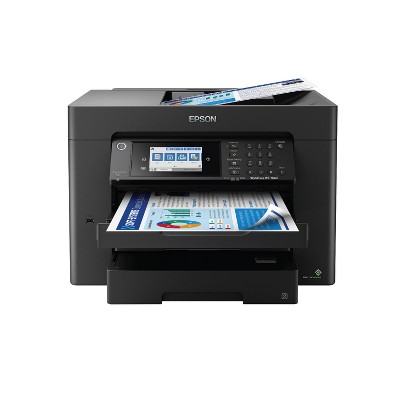
Epson EcoTank ET-4850 All-in-One Cartridge-Free Supertank Printer - White: Wi-Fi, Fax Capabilities
$499.99
Out of Stock

Free & easy returns
Return this item by mail or in store within 30 days for a full refund.
Eligible for registries and wish lists
About this item
Additional product information and recommendations
Related Categories
Discover more options




Frequently bought together



Guests also viewed


3.9 out of 5 stars with 193 reviews
quality: 3.25 out of 5
value: 3.5 out of 5
50% would recommend
4 recommendations
1 out of 5 stars
25 January, 2026
originally posted on epson.com

Problems with printer not printing the colors.
This printer worked fine for the first few months but then the colored ink quit showing up on the flyers indicating it was not functioning properly. All of the inks showed ink levels above 3/4 full. Several cleanings got the blue and cyan to work somewhat but never did get the magenta to show. So disappointing. I missed out on doing voluntary flyers for the Senior Citizens to let people know about the breakfasts, flea markets, bingo games, etc. Attendance to these events was way down because we couldn't get the flyers out to the public. So sad, I spent allot of money on this printer to have it be totally worthless.
1 reply from The Epson Team team - 4 months ago
Hi sab1, we are sorry to hear you are having issues with your Epson printer. Your ET-4850 includes a 1-year limited warranty plus free technical support for the life of your product. Our Epson Support Team would be happy to hear from you and can be reached at (562) 276-4382; Hours: Monday – Friday, 7 a.m. to 4 p.m. (PT). Sincerely, Joseph – The Epson Team.
1 out of 5 stars
23 January, 2026
originally posted on epson.com
Horrible quality, frustrating printer
I have had this printer for about 2 years now. There's little to enjoy here. 1) The printer is incredibly challenging to reliably get connected to WiFi. I assure you, this is not a user error - I am an IT administrator and deal with network connected devices all day. This is one of the most challenging devices I have had to deal with connecting to the WLAN. Once it's connected it seems to stay connected, but it is a chore. 2) Print Quality is not good. For the price of this printer, the quality is just not acceptable. Colors are washed out, text is not crisp and page to page the printing quality isn't even consistent. Not office quality printing at all. 3) Color printing. Good luck here. I can't tell you how many times I have had to use the clean print head function, only to have to run the power cleaning after (which recommends you wait 12 hours before printing again). Then to just have a garbled mess come out of the machine. I don't have a week to wait for my print job, Epson. This is trash. Yeah, ink is cheaper than toner. However, go buy yourself a Color laser jet. This one is not worth the hassle. DO NOT BUY THIS JUNK.
1 reply from The Epson Team team - 4 months ago
Hi elwood802, thank you for sharing your experience. Epson takes into consideration all feedback to improve the performance and quality of our products. We will forward your feedback to the relevant Epson department, as we are always looking to make future Epson products better. Your product includes a 1-year limited warranty. Our Advanced Epson Support Team would be happy to help you and can be reached at 1-800-241-5794; Hours: Monday – Friday, 7 a.m. to 4 p.m. (PT). Once again, thank you. Regards, Joseph – The Epson Team.
2 out of 5 stars
24 December, 2025
originally posted on epson.com
Garbage printer
I've had this printer for quite a while and for copies and office work it's great, but for printing pictures it's a absolute piece of crap. NOTHING has ever printed a quality or color setting even close to the picture on screen, and it's usually grainy. I've had Epson's, HP, Canon's, you name it since the 80's for home and work and I've never had issues with a printer like this piece of garbage. The best thing about it is the refillable ink tanks, but it's not worth one quarter of the ridiculous price I paid for it. I should have stuck with the HP I had.
1 reply from The Epson Team team - 5 months ago
Hi Popp, you can find product information, including FAQs and for additional information and to help optimize photo print settings in the product User’s Guide at www.epson.com/support/et4850. If you continue to have problems with your printer, our Epson Support Team would be happy to help you and can be reached at (562) 276-4382; Hours: Monday – Friday, 7 a.m. to 4 p.m. (PT). Have a great day. Sincerely, Joseph – The Epson Team.
2 out of 5 stars
11 September, 2025
originally posted on epson.com
Auto feeder not working and too noisy and slow
Have had this printer for a couple of years. For at least half of that time, the auto feeder has not worked. It’s noisy, slow to print, and a disappointment. The only good thing is the ink cost less.
1 reply from The Epson Team team - 8 months ago
Hi Chris T, we are sorry to hear you are having issues with your Epson printer. Your ET-3850 includes a 1-year limited warranty plus free technical support for the life of your product. Our Epson Support Team would be happy to hear from you and can be reached at (562) 276-4382; Hours: Monday – Friday, 7 a.m. to 4 p.m. (PT). Sincerely, Joseph
1 out of 5 stars
Thumbs down graphic, would not recommend
28 August, 2025Verified purchase
Broken printer
The printer was broken. I couldn’t get the past the installation since the scanner was broken.
1 reply from Epson team - 9 months ago
Hi Disappointed, we’re sorry to hear you’re having issues with your Epson ET-4850. Your product includes a 1-year limited warranty and free lifetime tech support. The Epson Advanced Support Team would be happy to help get your printer set up and resolve any issues. Please call us at 1-800-241-5794 between 7 a.m. – 4 p.m. (PT), Monday – Friday. Sincerely, Alissa A. – The Epson Team.
1 out of 5 stars
14 July, 2025
originally posted on epson.com
Cheap design, unreliable, messy software
From a hardware perspective - the product works. The software is a mess. Also the registration process is, at best, sloppy. Scanning works - sometimes - but there seem to be intermittent errors in the software communicating to the scanner. The scanner feed fails after about 3 pages, and often misfeeds or jams. Very cheap and unreliable design. The printer seems to constantly loose communication and the software had to be reinstalled to get the scanning to work. Bottom line, I would not recommend this product.
1 reply from The Epson Team team - 10 months ago
Hi printexpert, we are sorry to hear you are having issues with your Epson printer. Your ET-4850 includes a 1-year limited warranty plus free technical support for the life of your product. Our Epson Support Team would be happy to hear from you and can be reached at (562) 276-4382; Hours: Monday – Friday, 7 a.m. to 4 p.m. (PT). Sincerely, Joseph – The Epson Team.
5 out of 5 stars
13 July, 2025
originally posted on epson.com
New Printer
Worked as advertised out of the box. No issues.
5 out of 5 stars
Thumbs up graphic, would recommend
3 July, 2025Verified purchase
I'd give it 4.5 stars if I could
I've had the printer for 6 months and been very pleased. Contrary to some of the negative reviews, initial set-up was straightforward, connnectivity has been completely reliable, text printing is excellent, and it's very economical. My only criticism, and the reason I'd dock it half a star, is that color graphics aren't great -- colors aren't as vibrant as I'd like. If I printed a lot of images, especially photos, I probably wouldn't be satisfied with this printer. But my graphics printing is limited and color vibrancy not an issue. I should add that it's not fast. I'd be impatient if I were printing 50 page documents, but I never do; a half dozen pages is about my max. Given the choice over I'd definitely buy it again.
5 out of 5 stars
Thumbs up graphic, would recommend
1 July, 2025Verified purchase
Super
installation is easy.
2 out of 5 stars
24 April, 2025
originally posted on epson.com
Epson went backwards not forward ,, so sad
Loved my earlier Epson w Eco tank, this one is so much slower, seems to always disconnect from wireless operation, only 30 days to try and tweak and then no warranty. Something has happened to Epson, a $400 plus investment, that is far less valuable, in slow printing and finicky behaviors... Disappointed
1 reply from The Epson Team team - 1 year ago
Hi Epson Customer, we apologize about the disappointing experience you are having with your Epson printer's Wi-Fi connection. Your ET-4850 includes free technical support for the life of your product. Please call and let our Epson Support Team assist. Our support number is (562) 276-4382. Our support hours of operation are Monday – Friday, 7 a.m. to 4 p.m. (PT). We’re here to help. Sincerely, Joseph – The Epson Team.
5 out of 5 stars
23 April, 2025
originally posted on epson.com
Man Cave Printer
Love this copier. No more cartridges. Love the large ink well/containers
5 out of 5 stars
31 March, 2025
originally posted on epson.com
Epson printers eco tanks rock.
This is my second one I would never buy a printer that had cartridges ever. The one I’m replacing still works, but I’m taking it to my house and another state.
3 out of 5 stars
26 March, 2025
originally posted on epson.com
Not as good as I hoped
Pros: Nice compact footprint size for a home office with high print requirements. Love the tanks instead of ink cartridges - very economical for B&W printing. Moderate print speed (one-sided). Crisp printing when using Epson paper but not as good on store brand. I use the Print, Copy and Scan features but don't have it set up to fax. Cons: Quite a few things aggravate me. Slow print speed for two-sided when multiple copies are needed - I end up doing manual duplex. Poor color fidelity for photo printing - colors tend toward blue/cool tones. No separate feed for photo paper or heavy card stock. Flimsy ADF - originals often feed crookedly and jam or produce skewed copies. Slow at copying and scanning. Paper tray feels flimsy when reinserting in unit. Weirdly, it lost WiFi connection every time I used a document shredder withing 20 feet of the unit - that was a fun one to figure out! Setting up scanning to Cloud was a hassle. Overall, I bought this unit on sales so it was a good value for a general purpose printer, but it it's not a superstar in any area of operation. Photo printing is very disappointing but I love the freedom of printing draft documents without worrying about cost or running out of ink.
1 reply from The Epson Team team - 1 year ago
Hi Floriday Buyer, thank you for sharing your experience. Epson takes into consideration all feedback to improve the performance and quality of our products. We will forward your feedback to the relevant Epson department, as we are always looking to make future Epson products better. Your product includes a _-year warranty. Our Epson Support Team would be happy to help you and can be reached at (562) 276-4382; Hours: Monday – Friday, 7 a.m. to 4 p.m. (PT). Once again, thank you. Regards, Joseph – The Epson Team.
5 out of 5 stars
25 March, 2025
originally posted on epson.com
Great experience going on 2 years
Two years and so far, so good. A far cry from the cx-6600 days and the partially emptying ink cartridges and clogged printer heads. The only thing to remember is to print regularly to keep the tubes and print head flowing. Also, use the maintenance features once in a while. This is true with any inkjet printer, but not so bad with Ecotank refillable tanks. Design is great, easy to remove jams (seldom), takes all kinds of paper, UI is easy (easier than the Canon I had), and Wifi was a breeze. I only wish it had a user-serviceable waste cartridge that I could clean out, but at least you can replace replace it. I bought two and I have not needed yet to replace the original yet. Very straightforward. Some models do not allow you to replace the waste tank, so once it is filled it is now a useless printer. That ought to be illegal.
5 out of 5 stars
20 March, 2025
originally posted on epson.com
Great Printer
Very nice. Smaller footprint than my old Artisan 835 and the expensive cartridges. Good overall quality, easy setup, easy to fill without spillage. One bottle is one full tank. Print quality on personal high resolution test sheet shows very good color and black density scaling. Excellent color accuracy. The scanner feeds and images very well. The scanner software is much improved from the old Artisan.
1 out of 5 stars
11 March, 2025
originally posted on epson.com
Big Disappointment
I purchased the ET-4850. I am very disappointed. I set this printer up in my home office over the weekend. It's caused me nothing but issues. It stalls while scanning. I cannot print a different size paper in it, like a check. It jams every single time. I should have stuck with my old HP printer.
1 reply from The Epson Team team - 1 year ago
Hi BusinessChic, we are sorry to hear that you are having issues with your Epson ET-4850 printer. Please visit www.epson.com/support/et4850 for useful product information on optimizing print settings and avoiding paper jams. Your Epson includes free technical support for the life of your product. Our Epson Support Team would be happy to help you and can be reached at (562) 276-4382; Hours: Monday – Friday, 7 a.m. to 4 p.m. (PT). We appreciate your purchase, and we value your feedback. Sincerely, Joseph – The Epson Team.
1 out of 5 stars
10 March, 2025
originally posted on epson.com
DO NOT BUY THIS PRODUCT
WiFi Connection gets lost and keeps dropping. Epson support is of no help whatsoever!
1 reply from The Epson Team team - 1 year ago
Hi Epson Customer, we apologize about the disappointing experience you are having with your Epson printer's Wi-Fi connection. Your ET-4850 includes free technical support for the life of your product. Please call and let our Epson Support Team assist. Our support number is (562) 276-4382. Our support hours of operation are Monday – Friday, 7 a.m. to 4 p.m. (PT). We’re here to help. Sincerely, Joseph – The Epson Team.
4 out of 5 stars
9 March, 2025
originally posted on epson.com
Good Printer.
Wow. Didn't realize I've had this printer already for almost two years. EcoTank is great. Only wish that I'd be able to print on disks etc. (that's why I gave 4 out of 5 - otherwise it's excellent)! Also, the older software was better.
1 out of 5 stars
2 March, 2025
originally posted on epson.com
Terrible connectivity issues - printing and scanning
I have had this ET04850 over year and it has been the most frustrating combo printer I have ever owned! It has had tons of connection issues, stopped print jobs, stalled scans, etcc. We are so used to it not printing a job, that we just cycle the power on it and Wa La, the print job happens. Today, I just updated the firmware again. I also reinstalled the latest ESPON drivers onto my computer and of course my Windows 11 is totally up to date on my laptop. Over the last 20 years I have had two different HP's that were spot on for printing or scanning when you needed them - RARELY a connection issue. I bought this thing to save on ink, but BUYER BEWARE many times when I had to print or scan something quickly before leaving the house, I was faced with a half hour of frustration or not getting what I needed. BTW this is with two different computers. If this latest round of updates doesn't fix it, I am dumping EPSON and going back to an HP.
1 reply from The Epson Team team - 1 year ago
Hi ScouterJohn, we are sorry to hear you are having issues with your Epson printer. Your ET-4850 includes a 1-year limited warranty plus free technical support for the life of your product. Our Epson Support Team would be happy to hear from you and can be reached at (562) 276-4382; Hours: Monday – Friday, 7 a.m. to 4 p.m. (PT). Sincerely, Joseph – The Epson Team.
5 out of 5 stars
22 February, 2025
originally posted on epson.com
Nice home office printer
It came very well packaged in the box. It took a bit to get started but followed the instructions on my mobile phone by scanning the QR code on the set-up sheet. It takes you step by step on adding ink, setting up with wireless network, and setting proper print alignments. It does take a bit of time. I installed computer driver software from their website on my two home office pc’s with no problems. The print quality is good for an inkjet printer. Knowing (from my previous printer experience) if you want to have relatively problem free WiFi connectivity issues over time, you must assign the printer a static IP address (DHCP IP reservation). I did this through my home router. It will take you some time to figure it out, but it’s necessary, if you want to avoid your printer (on occasion) not responding when wanting to scan/print something. Here is a YouTube link that can be helpful on this topic. https://youtu.be/-G3ePnXAoHc?si=2vup_9_xeb8_qW2M