New ArrivalsEasterClothing, Shoes & AccessoriesHomeKitchen & DiningOutdoor Living & GardenFurnitureGroceryHousehold EssentialsBabyBeautyPersonal CareHealthWellnessBackpacks & LuggageSports & OutdoorsToysElectronicsVideo GamesMovies, Music & BooksSchool & Office SuppliesParty SuppliesGift IdeasGift CardsPetsUlta Beauty at TargetShop by CommunityTarget OpticalDealsClearanceTarget New ArrivalsHome Decor Ideas & TrendsTop DealsTarget Circle DealsWeekly AdShop Order PickupShop Same Day DeliveryRegistryRedCardTarget CircleFind Stores
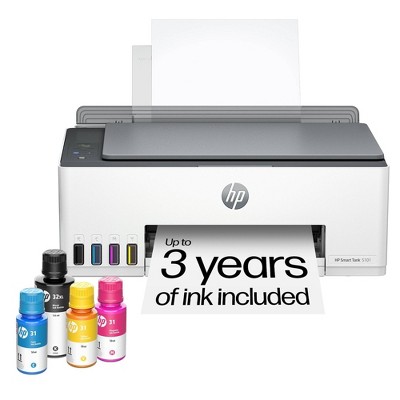
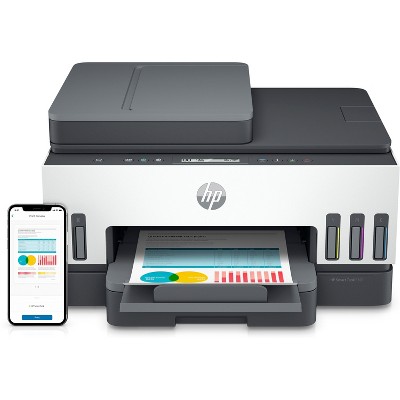
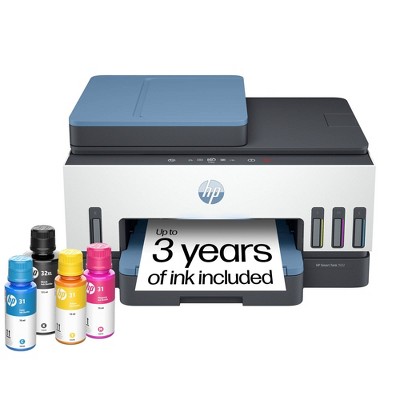
HP Smart Tank 6001 Wireless All-In-One Color Refillable Supertank Printer, Scanner, Copier - White (2H0B9A): Inkjet, Wi-Fi, USB - 2 of 4HP Smart Tank 6001 Wireless All-In-One Color Refillable Supertank Printer, Scanner, Copier - White (2H0B9A): Inkjet, Wi-Fi, USB - 3 of 4HP Smart Tank 6001 Wireless All-In-One Color Refillable Supertank Printer, Scanner, Copier - White (2H0B9A): Inkjet, Wi-Fi, USB - 4 of 4
HP Smart Tank 6001 Wireless All-In-One Color Refillable Supertank Printer, Scanner, Copier - White (2H0B9A): Inkjet, Wi-Fi, USB - 1 of 4

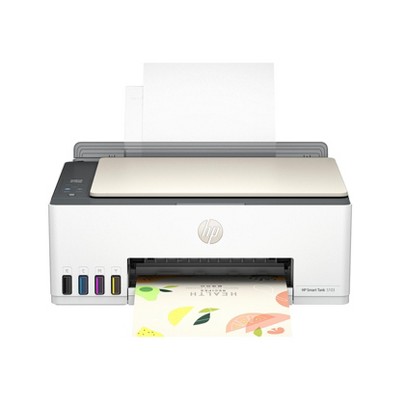
HP Smart Tank 6001 Wireless All-In-One Color Refillable Supertank Printer, Scanner, Copier - White (2H0B9A): Inkjet, Wi-Fi, USB

$249.99 reg $369.99
Sale save $120.00 (32% off)

In Stock

Eligible for registries and wish lists

About this item

Highlights

  • • Best for home printing
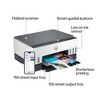
  • • Print, scan, copy and fax on the go with HP Smart app
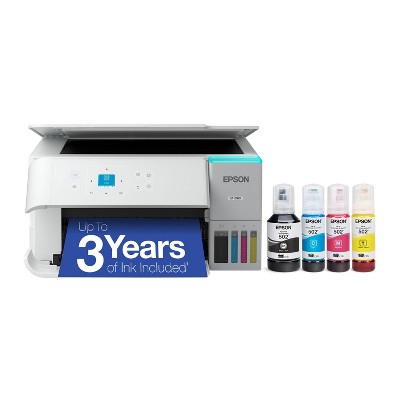
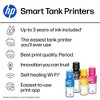
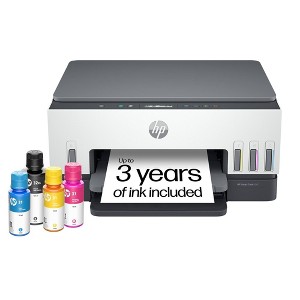
  • • Up to 3 years of ink included
  • • Built-in wireless
  • • Easy mobile setup
  • • Print up to 12 pages per minute (black), 7 pages per minute (color)
  • • USB 2.0
  • • AI-capable

Description

The HP Smart Tank 6001 Printer is a smart, connected and refillable tank printer that makes printing seamless for your home with its high capacity and wireless connectivity. Create everyday color documents at a low cost with up to 3 years of Original HP Ink included in the box. This cartridge-free Smart Tank printer is an inkjet perfect for high-volume printing. It's also AI-capable to intuitively adapt to your workflow, with wireless and security features that keep your multifunction printer up to date and secure.

THE ONLY TANK PRINTER BUILT TO LAST: Set it up once and print with confidence. No complicated maintenance. Just easy, reliable printing you can count on.

INK FOR YEARS. NOT MONTHS: up to 3 years of ink included. Get thousands of pages of cartridge-free printing. More pages, less hassle.

KEEPS PRINTING WELL AFTER COMPETITORS HAVE QUIT: No complex maintenance. Sharper text, richer colors. Only with HP Smart Tank

INNOVATION YOU CAN TRUST: Cartridge-free printing that keeps you printing longer with fewer interruptions, powered by the trusted HP innovation you rely on today.

THE LAST PRINTER YOU'LL EVER NEED: Enjoy years of refillable, cartridge-free printing.

MESS-FREE REFILL: Replenish ink with HP's easy-access, mess-free refill system. Simply plug the ink bottles into this cartridge-free ink tank and let them drain—no squeezing, no spilling.

OPTIMIZE PRINT FORMATTING WITH HP AI: Print web pages and emails with precision—no wasted pages or awkward layouts; HP AI easily removes unwanted content, so your prints are just the way you want.

KEY FEATURES: Print, copy and scan, plus borderless prints, mobile and wireless printing.

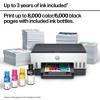
FULLY LOADED WITH SAVINGS – Best for low-cost, high-volume printing—up to 3 years of HP Ink included; get up to 8,000 color or 6,000 black pages right out of the box.
Dimensions (Overall): 7.82 Inches (H) x 16.83 Inches (W) x 14.33 Inches (D)
Weight: 14.07 Pounds
B&W Print Speed: 12 Pages per Minute
Color Print Speed: 7 Pages per Minute
Electronics Condition: New
Electronics Features: Printer
Connection Type: USB
Maximum capacity: 12 Sheets
Operating System Compatibility: Microsoft Windows
Maximum Resolution: 4800 x 1200 (Color)
Wireless Technology: Wi-Fi
Printer Ink Color: Magenta, Black, Cyan
Compatible With: Up to 8" x 10" Documents
Ink Series: HP Smart Tank 7000 series
Battery: No Battery Used
Warranty: 1 Year Limited Warranty. To obtain a copy of the manufacturer's or supplier's warranty for this item prior to purchasing the item, please call Target Guest Services at 1-800-591-3869
TCIN: 86250572
UPC: 196188310359
Item Number (DPCI): 056-03-0030
Origin: Imported
If the item details aren’t accurate or complete, we want to know about it.

Shipping details

Estimated ship dimensions: 18.9 inches length x 15.9 inches width x 9.4 inches height
Estimated ship weight: 18.15 pounds

Return details

This item can be returned to any Target store or Target.com.
This item must be returned within 30 days of the date it was purchased in store, delivered to the guest, delivered by a Shipt shopper, or picked up by the guest.
See the return policy for complete information.

Q: Can this print on photo fabric and canvas?

submitted by JoAnne - 1 year ago
  • A: Hello and thank you for asking. The HP Smart Tank 6001 printer can print on 8.5x11 card stock (in metric weight) up to 200 g/m²; and photo paper up to 250 g/m². There are ink jet printable fabric sheets, such as Avery 3384, that should work. However, the ink jet printable canvas sheets are rated at 350 g/m² weight, which is too heavy for this printer. If you choose to try it, be certain to set the printer for heavy paper/media and fill the paper tray to no more than 3/4 full. You may need to print one sheet at a time. HP has not tested all types of paper that may be used in their printers and therefore cannot guarantee results.

    submitted byHP Team - 1 year ago
    Brand expert
  • A: Hi JoAnne, thanks for reaching out about HP Smart Tank 6001 Wireless All-In-One Color Refillable Supertank Printer, Scanner, Copier - White (2H0B9A) HP's specifications for this printer list supported types as Plain Paper, HP Photo Papers, HP Matte Brochure or Professional Paper, HP Matte Presentation Paper, HP Glossy Brochure or Professional Paper, Other Photo Inkjet Papers, Other Matte Inkjet Papers, Other Glossy Inkjet Papers. 1 Light/Recycled." Fabric and canvas are not included. If you have any additional questions, we welcome you to contact MyTGTtech at 833-848-8324 every day, between 7am-11pm CST.

    submitted byMike - 1 year ago
    Target expert support

Q: Can you scan to your email with this printer?

submitted by CL - 1 year ago
  • A: Hi CL, thanks for reaching out about HP Smart Tank 6001 Wireless All-In-One Color Refillable Supertank Printer, Scanner, Copier - White (2H0B9A) Yes. To setup this functionality you'll want to use the HP printer assistant or the EWS to configure the email destination Enter the sender's email address and name Enter the SMTP server name and port number Input the appropriate SSL/TLS settings Select the maximum email size Choose to include the sender in all emails Click Finish If you have any additional questions, we welcome you to contact MyTGTtech at 833-848-8324 every day, between 7am-11pm CST.

    submitted byJustin - 1 year ago
    Target expert support
  • A: Thank you for your question, the HP Smart Tank 6001 does support scan to email.

    submitted byHP Team - 1 year ago
    Brand expert
  • A: Hi CL, thanks for reaching out about HP Smart Tank 6001 Wireless All-In-One Color Refillable Supertank Printer, Scanner, Copier - White (2H0B9A). Yes, the HP Smart Tank 6001 printer allows you to scan documents directly to your email. Here's how it generally works: HP Smart App: You'll likely use the HP Smart app (available for iOS and Android) to set up and manage this feature. Email Account Setup: Within the app, you'll need to configure your email account information, including your email address, password, and SMTP server settings. Scanning: Once set up, you can initiate a scan from the printer's control panel or through the HP Smart app. Email Delivery: The scanned document will be automatically sent as an email attachment to the specified address. Note: The specific steps and settings might vary slightly depending on your email provider and network configuration. I recommend referring to the HP Smart Tank 6001 user manual or the HP support website for detailed instructions and troubleshooting tips for scanning to email with your specific printer model. If you have any additional questions, we welcome you to contact MyTGTtech at 833-848-8324 every day, between 7am-11pm CST.

    submitted byJoe - 1 year ago
    Target staff support

Q: Does this printer come with a power cord?

submitted by Kristine - 2 years ago
  • A: Hello Kristine and thank you for the question. The HP Smart Tank 6001 Wireless Printer includes a power cord in the packaging.

    submitted byHP Team - 2 years ago
    Brand expert
  • A: Kristine, thank you for your question on the HP Smart Tank 6001! It comes with the power cord packed in the box.

    submitted byHP Team - 2 years ago
    Brand expert

Q: Can this be used without wifi?

submitted by Rita - 2 years ago
  • A: Hi Rita, thanks for reaching out about HP Smart Tank 6001 Wireless All-In-One Color Refillable Supertank Printer, Scanner, Copier - White (2H0B9A) . Yes, you can connect this HP Smart Tank 6001 printer to your computer with the USB A to B 2.0 cable. If you don't have a USB cable, you would need to purchase one. If you have any additional questions, we welcome you to contact MyTGTtech at 833-848-8324 every day, between 7am-11pm CST.

    submitted byJoe - 2 years ago
    Target staff support
  • A: Rita, thank you for your question on this HP Smart Tank printer! Yes, you can use it without the wifi through a regular USB printer cable.

    submitted byHP Team - 2 years ago
    Brand expert

Q: If you don’t use the printer for ( let’s say a month or two ) will the ink dry up? We don’t use our printer very often yet we’re constantly buying more ink for it cause it constantly dries up if not used regularly.

submitted by Nevaeh - 1 year ago
  • A: Can sublimation paper be used in this printer?

    submitted byCMORG - 10 months ago
  • A: Hello and thank you for asking. Any ink jet printer, including the HP Smart Tank 6001 printer, can suffer from dry out because ink is a liquid, and it will evaporate, leaving dried ink that clogs the printhead, preventing it from printing. To prevent this, just print something, even if it is just 1 page, every week or two. If you need to go longer than that, shut the printer down using the power switch on the printer FIRST before using a power strip or pulling the plug. That tells the printer to engage a printhead capping mechanism that keeps the ink from drying out for up to 3 months.

    submitted byHP Team - 1 year ago
    Brand expert

Q: Can I use my flash drives or media cards to print off of?

submitted by Cat - 1 year ago
  • A: Thank you for your question. No, the Smart Tank 6001 printer does not have a media card or flash drive slot.

    submitted byHP Team - 1 year ago
    Brand expert
  • A: Hi Cat, thanks for reaching out about the HP Smart Tank 6001 Wireless All-In-One Color Refillable Supertank Printer, Scanner, Copier. The HP Smart Tank 5101 Wireless All-in-One Printer does not have a built-in slot for flash drives or media cards. If you have any additional questions, we welcome you to contact MyTGTtech at 833-848-8324 every day, between 7 am-11 pm CST.

    submitted byRena - 1 year ago
    Target expert support

Q: Is the scanner OCR? Does the printer have a self feed component?

submitted by Cat - 2 years ago
  • A: Thank you for the question. The HP Smart Tank 6001 printer includes HP Smart Advance features through the HP Smart app, offering advanced scanning capabilities like Optical Character Recognition (OCR). However, this model does not have an Auto Document Feeder (ADF). If you need an ADF, we recommend considering the HP Smart Tank 7301 or 7602 All-in-One printers, which do include this feature.

    submitted byHP Team - 2 years ago
    Brand expert

Q: Is this compatible with a Chromebook?

submitted by Shabeena - 2 years ago
  • A: Thanks for your question. The HP Smart Tank 6001 printer is compatible with a Chromebook.

    submitted byHP Team - 2 years ago
    Brand expert

Q: Does this printer have the hardwire capability if there are connection issues?

submitted by age - 2 years ago
  • A: Hello, thanks for your question! The HP Smart Tank 6001 printer does not have ethernet connectivity for wiring to a network. You can connect the printer to a computer with the USB A to B 2.0 cable. You can also use WiFi Direct. WiFi Direct lets you print directly from your device to an HP printer without needing a router. The printer creates its own Wi-Fi network that your device connects to, allowing you to send print jobs directly.

    submitted byHP Team - 2 years ago
    Brand expert

Q: is this printer comparable with Windows 7?

submitted by Rose - 3 years ago
  • A: Hi Rose, thanks for reaching out about HP Smart Tank 6001 Wireless All-In-One Color Refillable Supertank Printer, Scanner, Copier - White (2H0B9A). Using a printer with Windows 7 is not recommended because Windows 7 is no longer supported by Microsoft. If you have any additional questions, we welcome you to contact MyTGTtech at 833-848-8324 every day, between 7am-11pm CST.

    submitted byJoe - 3 years ago
    Target staff support
  • A: The Smart Tank 6001 does have drivers for Windows 7 32 - bit and 64 - bit to work with it, but Microsoft no longer offers support or security updates for Windows 7. They will also be discontinuing Windows 10 support on October 14th, 2025.

    submitted byHP Team - 3 years ago
    Brand expert

Additional product information and recommendations

Guests are saying

The HP Smart Tank 6001 printer impresses with its compact design, user-friendly setup, and innovative ink tank system that eliminates the need for frequent cartridge replacements. Guests appreciate its high-quality printing, cost-effectiveness, and seamless connectivity options, making it ideal for home and small office use. While some guests experienced connectivity issues and slower response times, the overall satisfaction with print quality and ink longevity shines through, making it a reliable choice for diverse printing needs.
    Summary created by AI from text of reviews reflecting recent feedback provided across different star ratings (includes incentivized reviews)
    4.2 out of 5 stars with 551 reviews
    quality: 2.65 out of 5
    value: 2.24 out of 5
    65% would recommend
    38 recommendations
    3 out of 5 stars
    16 March, 2026
    originally posted on hp.com
    Image

    Set up took way to long

    Set up took way too long. I ended up having to get a second computer and my phone to get my wifi to finally connect. Bring back the direct connect so set up is easier.
    MDay2246
    Did you find this review helpful?
    1 out of 5 stars
    13 February, 2026Verified purchase

    (no review title)

    This worked great for a couple months, but we’ve had problems ever since then. I haven’t even had it a year and it doesn’t work at all.
    Alicia
    2 guests found this review helpful. Did you?
    1 out of 5 stars
    11 February, 2026
    originally posted on hp.com
    Image

    HP Smart Tank Tanks!

    This printer is crappy. It never connects to my laptop easily. I should have just bought a cheap printer to connect with a cable. I thought maybe the ink would last longer and that proved to be the least of my problems. Read the reviews and found out that everyone has issues with connections. Note to self...spend more time next time reading reviews. This is a piece of junk and the second HP printer I bought..issue with the first HP printer was an issue with the ink/carriage not moving & I waited too long to open before returning.
    hodi76
    2 guests found this review helpful. Did you?
    5 out of 5 stars
    3 February, 2026
    originally posted on hp.com
    Image

    Hit the mark!

    This product is exactly what I need for my classroom.
    Just a Teacher!
    1 guest found this review helpful. Did you?
    1 out of 5 stars
    31 January, 2026
    originally posted on hp.com
    Image

    Printer

    Never used
    Orangeken
    1 guest found this review helpful. Did you?
    3 out of 5 stars
    22 January, 2026
    originally posted on hp.com
    Image

    Tanks are great, but paper has jammed twice

    I've only had this printer for a week (coming off of an instant ink based printer to stop paying for ink monthly). I thought it would be a much better printer because it cost about three times as much as the instant ink printer. The print quality is good, but the paper has jammed twice and I'm not sure why. The paper is new/clean/flat. I had it on the floor which was carpet and perhaps not as even as a hard table. So, I put it on a solid piece of wood now so that it sits level now as intended and since then, no paper jams have occurred. I can't say whether or not it was worth the cost quite yet as it's still new, but fingers crossed!
    owdu28dj
    1 guest found this review helpful. Did you?
    1 out of 5 stars
    Thumbs down graphic, would not recommend
    16 January, 2026Verified purchase

    Issues after one year

    I purchased the HP Smart Tank 6001 Wireless All In One in November 2024, and it is now completely unusable. The printer suddenly displays an error stating that the printerhead is missing, even though it has never been removed or tampered with. This is not normal wear and tear-it's a critical hardware failure that renders the printer unable to print at all. Troubleshooting steps, resets, and software updates did not resolve the issue. For a printer that is a little over a year old, this is unacceptable. I expected better reliability from HP and would not recommend this model. I will not be purchasing another HP Printer.
    Sheets101
    quality: 1 out of 5
    value: 1 out of 5
    3 guests found this review helpful. Did you?
    5 out of 5 stars
    15 January, 2026
    originally posted on store.hp.com
    Image

    How ever good

    WIFI CONNECTIVITY PROBLEM ARRISE
    Did you find this review helpful?
    4 out of 5 stars
    Thumbs up graphic, would recommend
    10 January, 2026Verified purchase

    Misleading picture of printer

    Picture says 3 years of ink, but actual package says 2 years.
    Chris H
    quality: 5 out of 5
    value: 4 out of 5
    1 guest found this review helpful. Did you?
    5 out of 5 stars
    2 January, 2026
    originally posted on hp.com
    Image

    Cheap ink!

    Easy set up and great quality
    Chazi
    1 guest found this review helpful. Did you?
    1 out of 5 stars
    Thumbs down graphic, would not recommend
    1 January, 2026Verified purchase

    WORST PRINTER EVER!!!!!!

    This printer worked just past the warranty date of one year!! I’ve had other HP printers & they worked for at least 3 years…DON’T WASTE YOUR MONEY…buy a different one!
    CarsonsNana 2020
    quality: 1 out of 5
    value: 1 out of 5
    Did you find this review helpful?
    1 out of 5 stars
    Thumbs down graphic, would not recommend
    19 December, 2025Verified purchase

    Terrible set up process, never worked. Do not buy.

    Terrible, couldn’t get to connect the printer to my computer using all recommended pathways, mobile device, HP app, HP website, etc. Returning the printer unused today.
    Vic
    quality: 1 out of 5
    value: 1 out of 5
    1 guest found this review helpful. Did you?
    4 out of 5 stars
    21 November, 2025
    originally posted on The Insiders
    Image

    Interesting design

    [This review was collected as part of a promotion.] While HP is clearly a leader in printers, I have had mixed results and lots of frustration from their products. I was a bit skeptical of this design. It was not completely clear how everything worked at first glance. Instructions were helpful, which is not always the case with HP. I was glad that the ink containers were all used as I was concerned how well they would stop if the whole contents did not load into the printer. Still a question for the future when I go to refill and don’t wait until they are 100% empty. Hoping the ink windows are effective in letting me know when I am low before completing running out. Also hoping the refills are not overly expensive. Ink was easy to fill. Print heads went in easily. I like the all in one aspect as it is nice to have a copier handy, in addition to the printer. Scanning is a bonus feature, as is 2 sided printing (if I can only remember which way to put in the paper with the printing already on it). It prints fast and has good resolution. Limited use so far, but works ok. Let’s see if it continues.
    ingowarrior55
    1 guest found this review helpful. Did you?
    5 out of 5 stars
    19 November, 2025
    originally posted on The Insiders
    Image

    Perfect sized printer

    [This review was collected as part of a promotion.] This printer is the perfect size for my space. The set up process was fairly easy and installing the ink was fairly entertaining and fun as well. I love the copy function and how easily it connects to my laptop so all my scanned documents are uploaded to the folders I desire. The printing speed could be a little faster but I may need to play around with the settings first to see if there’s a way to improve that. Overall I love this printer
    DoingMyOwnDing
    1 guest found this review helpful. Did you?
    5 out of 5 stars
    19 November, 2025
    originally posted on The Insiders
    Image

    Eco friendly Printer for bulk printing

    [This review was collected as part of a promotion.] This printer set up was so easy and seamless that i was able to follow the process with the smart app and it was ready to print in minutes. This is the first time i have seen refillable ink tanks and which seems to be a big plus as there is lot more ink and the printer can print a lot of documents before even it needs any refil. Also, the quality of the prints is also very good with out any ink smudges, even the pictures were printed very sharp and the colors came out good. i was able to easily connect to printer from my laptop and my phone very easily and above all, it also supports double sided printing. it barely made any noise when printing which was super helpful when i have to print when i am in a meeting. I think finally this printer is made to be more eco friendly as there is no need to discard any ink cartridges and that made it very conomical and hassle free and at the same time gave me high quality and high volume printer.
    1 guest found this review helpful. Did you?
    5 out of 5 stars
    19 November, 2025
    originally posted on The Insiders
    Image

    Great Printer

    [This review was collected as part of a promotion.] This HP printer/scanner is a great addition to any home office. It was extremely simple to install so long you follow the instructions! I highly recommend you follow them exactly how it's written or your success rate will be Zero! The ink is inexpensive which is a bonus.
    belinda133
    Did you find this review helpful?
    5 out of 5 stars
    19 November, 2025
    originally posted on The Insiders
    Image

    Huge Ink Savings & Perfect for Busy Households!

    [This review was collected as part of a promotion.] I absolutely love the HP Smart Tank 6002. One of the biggest reasons is how much money I’ve saved on ink. The tank system lasts incredibly long, and I don’t have to constantly worry about buying expensive cartridges every few weeks. For anyone who prints a lot—school papers, work documents, forms—this printer is a game-changer. It also feels sturdier and more reliable than other printers I’ve owned. I honestly think it will last much longer because of the build quality and design. The look is clean, modern, and fits perfectly on any table or desk at home. If you have kids who constantly need things printed for school, this is the best printer you can get. I 100% recommend it to families or anyone who wants to save money and avoid the headache of running out of ink all the time.
    Amir3
    2 guests found this review helpful. Did you?
    5 out of 5 stars
    14 November, 2025
    originally posted on The Insiders
    Image

    Say goodbye to frequent ink cartridge refills!

    [This review was collected as part of a promotion.] I've always used printers that use expensive cartridges that you constantly have to buy refills for, so I've always wanted to try a printer that uses bottles instead so I could lower costs. This HP Smart Tank 6002 was a great choice to try out! It took less than 10 minutes for me to unbox and set up this printer. It does have more steps than your usual printer as you have to manually fill each ink color, but in the end I'd say it's worth it for the amount I'll be saving on ink. It's also very nice that it has windows to see how much ink you have left, so you're not left guessing when you'll next have to run out and buy ink.
    Niccipasta
    1 guest found this review helpful. Did you?
    5 out of 5 stars
    14 November, 2025
    originally posted on The Insiders
    Image

    Best HP Printer Ever

    [This review was collected as part of a promotion.] I absolutely love my HP Smart Tank 6002. It has been such a game changer for my creative projects, especially when printing stickers. The colors come out vibrant and sharp every time, and it is incredibly efficient. I can print a lot without worrying about running out of ink or constantly replacing cartridges. It is fast, reliable, and the quality always impresses me. This is easily one of my favorite purchases and perfect for anyone who loves colorful, high-quality prints.
    BlackWomenLoveDogs
    1 guest found this review helpful. Did you?
    5 out of 5 stars
    14 November, 2025
    originally posted on The Insiders
    Image

    Easy Setup and super quality

    [This review was collected as part of a promotion.] Ok, I've had an HP printer in the past and it was a difficult setup. Not this one though , I like the easy tonread instructions and love love love how the ink tanks are right there, huge and in front of you . Only issue was the power plug insertion in the back , I had a little difficulty putting it in and making it go in all the way. The printer itself comes with ink and its supposed to last up to 2 years. That's pretty impressive. Overall. Its a good size, not too small and not oversized either. Love how it offers double sided printing and most of all the quality of the prints.
    DianaKatz123
    1 guest found this review helpful. Did you?

    Get top deals, latest trends, and more.

    Privacy policy

    Footer

    About Us

    About TargetCareersNews & BlogTarget BrandsBullseye ShopSustainability & GovernancePress CenterAdvertise with UsInvestorsAffiliates & PartnersSuppliersTargetPlus

    Help

    Target HelpReturnsTrack OrdersRecallsContact UsFeedbackAccessibilitySecurity & FraudTeam Member ServicesLegal & Privacy

    Stores

    Find a StoreClinicPharmacyTarget OpticalMore In-Store Services

    Services

    Target Circle™Target Circle™ CardTarget Circle 360™Target AppRegistrySame Day DeliveryOrder PickupDrive UpFree 2-Day ShippingShipping & DeliveryMore Services
    PinterestFacebookInstagramXYoutubeTiktokTermsCA Supply ChainPrivacy PolicyCA Privacy RightsYour Privacy ChoicesInterest Based AdsHealth Privacy Policy