


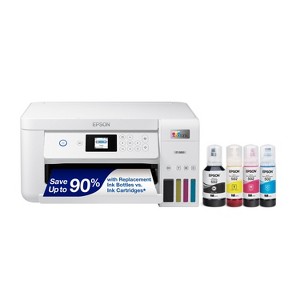
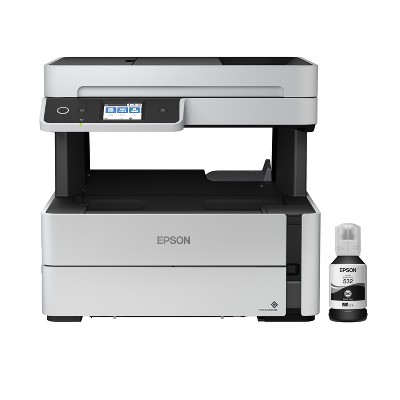
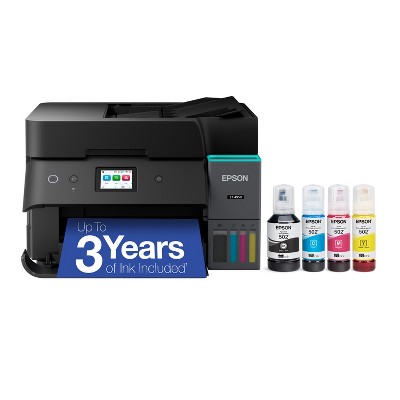
Epson EcoTank ET-2850 Wireless Color All-in-One Cartridge-Free Supertank Printer, Copier, Scanner - White: Smartphone Controlled, USB, Wi-Fi
$349.99
Out of Stock

Free & easy returns
Return this item by mail or in store within 30 days for a full refund.
Eligible for registries and wish lists
About this item
Additional product information and recommendations
Related Categories
Discover more options








Frequently bought together
- Highly rated$299.99 - $599.99reg $349.99 - $649.99 SaleGet the iPad (A16) for as low as $33/mo. on select items4.1 out of 5 stars with 2378 ratings







Guests also viewed

Guests are saying
The Epson ET 2850 EcoTank printer has received mixed feedback from guests, highlighting both its innovative ink tank system and significant performance issues. While some appreciate the ease of setup and potential savings on ink, many express frustration over poor print quality, frequent paper jams, and connectivity problems. Guests have noted that the printer struggles with thicker paper and often requires maintenance to function properly. Overall, it may be suitable for light use but has not met the expectations of many users.
Summary created by AI from text of reviews reflecting recent feedback provided across different star ratings (includes incentivized reviews)
3.2 out of 5 stars with 291 reviews
quality: 2.31 out of 5
value: 2.38 out of 5
35% would recommend
14 recommendations
1 out of 5 stars
30 April, 2026
originally posted on epson.com

Should be called the "Waste-o-Money ET 2850"
This printer is absolute trash. The prints come out faded or not visible at all. Then I have to clean the nozzle, clean the print head, there's like 7 steps of "maintenance" all to print out one paper. Save your money and look elsewhere. I literally ripped mine apart with my bare hands out of frustration for 2 years. $350 for a useless printer. So long EPSON: Never again.
1 reply from Epson Service team - 18 days ago
Hello JohnDow, we apologize for the disappointing experience you’ve encountered with your Epson printer. Your ET-2850 includes free technical support for the life of your product. Please reach out to our Epson Support Team for assistance at (562) 276-4382; Hours: Monday – Friday, 7 a.m. to 4 p.m. (PT). We’re here to help. Sincerely, Jacob – The Epson Team.
5 out of 5 stars
15 April, 2026
originally posted on epson.com
(no review title)
Makes beautiful pictures
2 out of 5 stars
10 April, 2026
originally posted on epson.com
When it was new worked fine , now NOT so MUCH
I bought this 3 years ago and I'm not very happy
1 reply from The Epson Team team - 1 month ago
Hi Booya, we are sorry to hear you are having issues with your Epson printer. Your ET-2850 includes free technical telephone support for the life of your product. Our Epson Support Team would be happy to help you and can be reached at (562) 276-4382; Hours: Monday – Friday, 7 a.m. to 4 p.m. (PT). Sincerely, Joseph – The Epson Team.
1 out of 5 stars
10 April, 2026
originally posted on epson.com
Worst printer I have ever had.
I bought this, believing it would be as great as the first Epson I bought many years ago. I have never been more disappointed in a product. The printing colors and clarity is never the same. And when I go online to find out what I can do, it is hard to find a way to communicate. The fixes they give do not work for me, and I have never been so frustrated with a product. I doubt that I will ever return to this company.
1 reply from The Epson Team team - 1 month ago
Hi Honestly, we're sorry for the disappointing experience you had with your Epson printer. Your ET-2850 includes free technical support for the life of your product. Please give us the opportunity to assist you by calling our Epson Advanced Support Team. We can be reached at 1-800-241-5794; Hours: Monday – Friday, 7 a.m. – 4.p.m. PT. We're here to help. Sincerely, Joseph – The Epson Team.
1 out of 5 stars
10 April, 2026
originally posted on epson.com
Bad printer. Avoid
This printer has been extremely frustrating to use. Print quality is inconsistent...it frequently misses spots and produces incomplete prints. Even for simple tasks, you often have to wait while it runs nozzle and print head cleaning cycles before it can attempt to print again. Overall, it’s unreliable and not worth the hassle.
1 reply from The Epson Team team - 1 month ago
Hi EricMk, we are sorry to hear you are having issues with your Epson printer. Your ET-2850 includes a 1-year limited warranty plus free technical support for the life of your product. Our Epson Support Team would be happy to hear from you and can be reached at (562) 276-4382; Hours: Monday – Friday, 7 a.m. to 4 p.m. (PT). Sincerely, Joseph – The Epson Team.
1 out of 5 stars
31 March, 2026
originally posted on epson.com
Errors and gets paper jams constantly
This is my second eco print printer and I will never buy another, The paper is constantly getting stuck in the printer and it prints missing lines all the time. This printer is used regularly and it lets me down constantly, I heard good things prior to purchasing the first but I just cannot recommend them at all.
1 reply from The Epson Team team - 2 months ago
Hi may0927, we are sorry to hear that you are having issues with your Epson ET-2850 printer. Please visit www.epson.com/support/et2850 for useful product information on optimizing print settings and avoiding paper jams. Your Epson includes free technical support for the life of your product. Our Epson Support Team would be happy to help you and can be reached at (562) 276-4382; Hours: Monday – Friday, 7 a.m. to 4 p.m. (PT). We appreciate your purchase, and we value your feedback. Sincerely, Joseph – The Epson Team.
1 out of 5 stars
31 March, 2026
originally posted on epson.com
Garbage out of the box
Absolute GARBAGE! Don't buy this printer. Problem after problem. Constantly cleaning print heads to print one page, and it stops printing again. Skips lines. Random error messages. All from day one. Epson should be embarrassed selling this product. Never again.
1 reply from Epson Service team - 2 months ago
Hello WSche, we apologize for the disappointing experience you’ve encountered with your Epson printer. Your ET-2850 includes free technical support for the life of your product. Please reach out to our Epson Support Team for assistance at (562) 276-4382; Hours: Monday – Friday, 7 a.m. to 4 p.m. (PT). We’re here to help. Sincerely, Jacob – The Epson Team.
1 out of 5 stars
16 February, 2026
originally posted on epson.com
Horrible durability and connectivity
Bought one year ago. Will no longer print in color (fails to incorporate cyan) and has horrible connectivity issues. Do not buy this printer.
1 reply from Epson Service team - 3 months ago
Hi Austin101, we apologize about the disappointing experience you are having with your Epson printer's Wi-Fi connection. Your ET-2850 includes free technical support for the life of your product. Please call and let our Epson Support Team assist. Our support number is (562) 276-4382. Our support hours of operation are Monday – Friday, 7 a.m. to 4 p.m. (PT). We’re here to help. Sincerely, Jacob – The Epson Team.
5 out of 5 stars
14 February, 2026
originally posted on epson.com
Great printer
I researched this printer for price and for print ink options and reliability. So far everything is great. Download the Epsom app and follow directions to set up. So easy.
5 out of 5 stars
6 February, 2026
originally posted on epson.com
Excellent printer!
After years of paying astronomical fees on printing, I LOVE having my new Epson! How nice to have the refillable bottles that are so economical and simple to fill. It prints great, prints both sides - so happy for this purchase!!
1 out of 5 stars
Thumbs down graphic, would not recommend
6 February, 2026Verified purchase
Many issues
Dislike! This item has a hard time registering paper size other than printer paper
1 reply from Epson team - 3 months ago
Hi Gabby, we are sorry to hear that you are experiencing issues with your printer. Your ET-2850 includes free technical support for the life of your product. Our Epson Support Team would be happy to help and can be reached at (562) 276-4382; Hours: Monday – Friday, 7 a.m. – 4 p.m. PT. Sincerely, Joseph – The Epson Team.
1 out of 5 stars
5 February, 2026
originally posted on epson.com
Terrible service.
I had a bad experience. My printer stopped working via Wi-Fi, saying it couldn't connect and giving an error. I reported it, but there was no solution. I bought a USB cable, and it worked for a while, but now it doesn't even work with the cable. I lost the warranty, and I lost my money. Terrible service.
1 reply from The Epson Team team - 3 months ago
Hi iova, we apologize about the disappointing experience you are having with your Epson printer's Wi-Fi connection. Your ET-2850 includes free technical support for the life of your product. Please call and let our Epson Support Team assist. Our support number is (562) 276-4382. Our support hours of operation are Monday – Friday, 7 a.m. to 4 p.m. (PT). We’re here to help. Sincerely, Joseph – The Epson Team.
1 out of 5 stars
4 February, 2026
originally posted on epson.com
Inadequate instruction on how to use this machine.
No written instructions for usage and how to interpret the tiny screen on the machine. Very frustrating!!!
1 reply from The Epson Team team - 3 months ago
Hi Epson Customer, thank you for sharing your experience. Epson takes into consideration all feedback to improve the performance and quality of our products. We will forward your feedback to the relevant Epson department, as we are always looking to make future Epson products better. Your product includes a 1-year limited warranty. Our Advanced Epson Support Team would be happy to help you and can be reached at 1-800-241-5794; Hours: Monday – Friday, 7 a.m. to 4 p.m. (PT). Once again, thank you. Regards, Joseph – The Epson Team.
1 out of 5 stars
11 January, 2026
originally posted on epson.com
Bad
Overall just a bad printer
1 reply from The Epson Team team - 4 months ago
Hi Sybau, we are sorry to hear you are having issues with your Epson printer. Your ET-2850 includes free technical telephone support for the life of your product. Our Epson Support Team would be happy to help you and can be reached at (562) 276-4382; Hours: Monday – Friday, 7 a.m. to 4 p.m. (PT). Sincerely, Joseph – The Epson Team.
1 out of 5 stars
30 December, 2025
originally posted on epson.com
Save your money and sanity
Absolutely horrible. Received as a Christmas gift in 2024 and has been an absolute nightmare. Sometimes it's connected, sometimes it's not. It's NEVER ready for a print job. I am currently 7 minutes in to its cleaning of the ink heads and what not. Sections of ink are ALWAYS missing, so it has to do its cleaning, organizing, preparing, recleaning, recleaning... another reclean... oh, then its got to reline... or whatever it does. Good lord. I'm on 2 of 7 of the maintenance process.... it's been over 10 mins because its slow and sections of ink are always missing. Now we've got the black ink, but no color. And yes, the ink was just filled recently. I'm going to try and print 1 more time..... nice, it printed a blank page!
1 reply from The Epson Team team - 5 months ago
Hi Nitroqueen, we are sorry to hear you are having issues with your Epson printer. Your ET-2850 includes a 1-year limited warranty plus free technical support for the life of your product. Our Epson Support Team would be happy to hear from you and can be reached at (562) 276-4382; Hours: Monday – Friday, 7 a.m. to 4 p.m. (PT). Sincerely, Joseph – The Epson Team.
1 out of 5 stars
24 December, 2025
originally posted on epson.com
This printer needs help
Worked first month or so then boom... Blank pages, striped printing.... Now I'm running issues with downloading the driver. Remember office space.. This printer is it. But hey, I can scan documents. 1 by 1 which is also painful. Sorry for sounding like a Karen this printer is large paper weight.
1 reply from The Epson Team team - 5 months ago
Hi valqa, we are sorry to hear you are having issues with your Epson printer. Your ET-2850 includes a 1-year limited warranty plus free technical support for the life of your product. Our Epson Support Team would be happy to hear from you and can be reached at (562) 276-4382; Hours: Monday – Friday, 7 a.m. to 4 p.m. (PT). Sincerely, Joseph – The Epson Team.
1 out of 5 stars
6 December, 2025
originally posted on epson.com
Slow print
Printing is extremely slow, no where close to 10.5 ppm. So disappointed, I have tried all setting options.
1 reply from The Epson Team team - 5 months ago
Hi Lloydy329, we are sorry to hear you are having issues with your Epson printer. Your ET-2850 includes free technical telephone support for the life of your product. Our Epson Support Team would be happy to help you and can be reached at (562) 276-4382; Hours: Monday – Friday, 7 a.m. to 4 p.m. (PT). Sincerely, Joseph – The Epson Team.
3 out of 5 stars
7 November, 2025
originally posted on epson.com
Nice printing, nice ink tanks, TERRIBLE wireless connection
I have had the WT2850 for about one month. The print quality is great, and I love the tanks vs cartridges. HOWEVER--the wireless connection is terrible. After 3 weeks, this printer keeps losing connection to my wi-fi signal. Nothing else in the house is having this problem. Epson has included a special "reconnection" app (probably due to known issues) that automatically opens when connection is lost. It is highly inconvenient to spend 8-10 minutes reestablishing the connection just to print 6 pages. I guess I'll have to use a cable to connect to printer, which defeats the wireless feature altogether.
1 reply from The Epson Team team - 6 months ago
Hi pmb1, we apologize about the disappointing experience you are having with your Epson printer's Wi-Fi connection. Your ET-2850 includes free technical support for the life of your product. Please call and let our Epson Support Team assist. Our support number is (562) 276-4382. Our support hours of operation are Monday – Friday, 7 a.m. to 4 p.m. (PT). We’re here to help. Sincerely, Joseph
1 out of 5 stars
23 October, 2025
originally posted on epson.com
worse printer ever
I wish I can give zero rating, the money spendd in this printer went straight to the toilet, this is the worse printer i ever had, since I purchased over a year ago, it wifi keep disconnecting, although is seating right next to the router , and it doesn't have a ethernet jack, only provides a usb-b for wired connection which can only be to a single computer, the screen is smaller than my watch, and the stupid keyboard is useless for uptodate network security password and it wasn't cheap
1 reply from The Epson Team team - 7 months ago
Hello Epson Customer, we apologize for the disappointing experience you’ve encountered with your Epson printer. Your ET-2850 includes free technical support for the life of your product. Please reach out to our Epson Support Team for assistance at (562) 276-4382; Hours: Monday – Friday, 7 a.m. to 4 p.m. (PT). We’re here to help. Sincerely, Joseph
1 out of 5 stars
Thumbs down graphic, would not recommend
18 September, 2025Verified purchase
Poor cuatomer service
I’m giving this one star because my printer did not scan and then when I returned it with my prepaid target ups label and it arrived to them (seen through tracking details) they refused to issue my refund. I have been in contact with them 7 times though the chat with them pushing me off to other people that never contacted me. I have o to asked for my refund money since there are no replacements available and they continue to tell me to wait 10 business days, which we are at…then told to wait 5-7 more days. Do better, I should not have to keep asking for my refund because you have dropped the ball on it.
1 reply from Epson team - 8 months ago
Hi Becky, thank you for sharing your experience. Epson takes into consideration all feedback to improve the performance and quality of our products. We will forward your feedback to the relevant Epson department, as we are always looking to make future Epson products better. Once again, thank you. Regards, Joseph – The Epson Team.