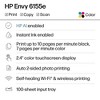
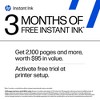
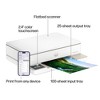
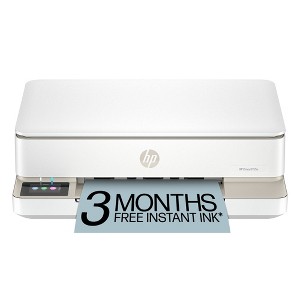
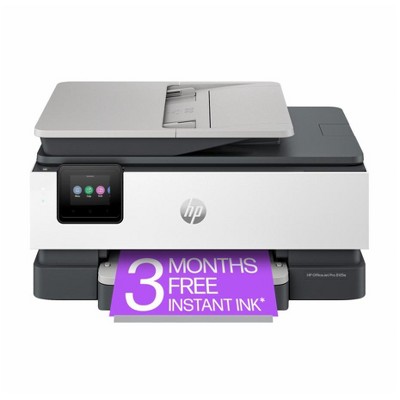
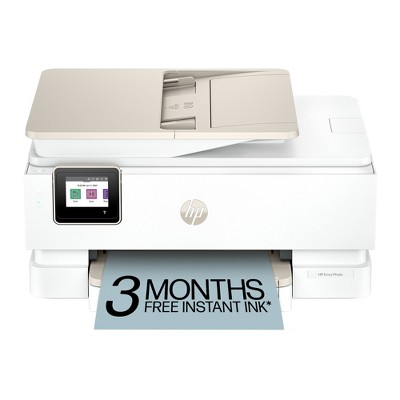
HP Envy 6155e Wireless All-in-One Color Printer Scanner Copier with 3 Months Free Instant Ink (714L5A): USB, Wi-Fi, 1200x1200 DPI
$159.99
In Stock
Eligible for registries and wish lists
About this item
Additional product information and recommendations
Discover more options



Frequently bought together
- $99.99 - $149.99reg $129.99 - $179.99 SaleGet the AirPods 4 starting at $13/mo. on select items3.9 out of 5 stars with 4450 ratings


Guests also viewed





Related Categories
Guests are saying
The printer offers a simple setup process and delivers impressive print quality, making it a reliable choice for both home and office use. Guests appreciate its sleek design and modern features, including wireless connectivity and double-sided printing. However, some concerns arise regarding ink consumption and compatibility with older cartridges. Overall, it serves well for everyday printing needs, especially with the option of an ink subscription for convenience.
Summary created by AI from text of reviews reflecting recent feedback provided across different star ratings (includes incentivized reviews)
4.0 out of 5 stars with 670 reviews
25% would recommend
66 recommendations
5 out of 5 stars
7 June, 2026
originally posted on store.hp.com

Everything works well for home ! Only dislike - the ridiculous high price of replacement INKS !
Good lower value priced unit
1 out of 5 stars
Thumbs down graphic, would not recommend
31 May, 2026Verified purchase
(no review title)
Printer is already having issues and with very minimal printing over 3 months ink is already out
5 out of 5 stars
27 May, 2026
originally posted on hp.com

(no review title)
its very good perfect for my requirements
5 out of 5 stars
26 May, 2026
originally posted on hp.com
Good printer
Bought few weeks ago to replace hp deskjet printer which was years old and print quality not good. This hp envy is just what i need. Good clear printing and set up not too difficult. Easy to transfer hp ink plan from old printer to new printer. Very pleased with the printer.
4 out of 5 stars
Thumbs up graphic, would recommend
23 May, 2026Verified purchase
Nice printer, easy setup
Setup was simple for wireless and it prints pages with great quality. 4 stars is only because the cartridges may be used to fast depending on how much you print. For both black and white or colored you should be ok. If you're printing photos it will go fast. You have to decide whether you're going to buy genuine HP cartridges when needed or signup for HP Instant Ink subscription. If you go with the subscription you get 3 months unlimited ink free with no delivery cost. The printer must stay online to monitor when the ink is low which will be sent automatically. If you use that and decide to buy genuine HP ink after, the cartridges will be deactivated on the spot even if they are full. If you buy the cartridges and later want to use the subscription, you lose the 3 months free offer. No fee for subscription. Just depends on preference. Instant ink is worth it in my opinion.
5 out of 5 stars
22 May, 2026
originally posted on hp.com
Good product.
Bought this to replace my previous model. Quality is good, prints well, and quickly.
5 out of 5 stars
21 May, 2026
originally posted on hp.com
Smooth transaction- good printer.
A good buy, whole process went smoothly and the printer is working well- I’m pleased with the outcome.
1 out of 5 stars
21 May, 2026
originally posted on hp.com
Constant squeeking and no printing
Awful printer, bought to replace broken HP Envy that I've had four around 10 years with very few problems so thought I'd go with HP again, I wish I hadn't or that I chosen a different model. I can print a test page from one laptop but nothing else, have had support on the phone for over an hour at a time two or three times and have not heard anything back for about two weeks, currently having to send everything I want to print to my phone or print from my old laptop, oh both are HP laptops so no idea why the printer seems so incompatible
5 out of 5 stars
19 May, 2026
originally posted on hp.com
Excellent printer
I am very pleased with the performance of my new printer. I have had many printers over the years from other suppliers, but this is the best. It prints beautifully and the wi-fi actually works. I am however concerned about the arrangements for ink supply once the initial supply runs out. I am a light user and your suggested monthly contract is expensive. But we will face that problem when it comes.
5 out of 5 stars
Thumbs up graphic, would recommend
19 May, 2026
The only printer that I've ever liked
Without exaggeration - the only printer I’ve ever owned that does what you ask it to do without issues. Add in the price point - and you have a perfect combination! I’ve fought countless printers, a few HPs, and this is a breath of fresh air. Also, modern, simple, sleek, great colors.
5 out of 5 stars
15 May, 2026
originally posted on hp.com
Does what it says on the tin!
Bought this a couple of weeks ago and so far very happy with it.
4 out of 5 stars
14 May, 2026
originally posted on hp.com
HP Envy 6120e
I bought an HP Envy 6120e three weeks ago and so far I am very happy with my purchase. It was easy to set up and was immediately effective in producing the printed documents I require. I have only two slight quibbles. One is that it is not possible to see how much paper remains in the feeder tray so it sometimes runs out mid-print. The second is that the ink cartridges were not compatible with my old printer so theey were wasted.
1 out of 5 stars
10 May, 2026
originally posted on hp.com

Horrible!
This my third HPPrinter in my lifetime. My first two were wonderful. Easy to use and dependable. This new HP is horrible. I consistently cannot print from my laptop or phone. I work from home and this is crippling me.
5 out of 5 stars
10 May, 2026
originally posted on hp.com

Easy Peasy
Wonderful little thing. Easy to set up. Does it all.
5 out of 5 stars
9 May, 2026
originally posted on hp.com
Highly Recommend
This is my second HP Printer, Its great ! and with 6 months instant ink what is that not to like. Perfect in every way, would highly recommend.
5 out of 5 stars
8 May, 2026
originally posted on hp.com
Brilliant kit.
Excellent and quick delivery. Worked on start up and connected. Digital panel much better than the earlier model button pressing..
5 out of 5 stars
8 May, 2026
originally posted on hp.com
Excellent
Great little printer with all HP STUFF
5 out of 5 stars
7 May, 2026
originally posted on hp.com
HP Envy 6155e AllinOne Printer
Great printer. Easy to use. Nice looking modern style.
4 out of 5 stars
7 May, 2026
originally posted on hp.com
Purchased to replace an older printer that wasn't working.
Purchased this some 4 weeks ago as my old printer wasn't working. Did request new black ink but nothing rec'd. As desperately needed printer had to order a new one which seems ok. Do miss being able to switch from A4 to photo without having to change paper in tray.
5 out of 5 stars
7 May, 2026
originally posted on hp.com
(no review title)
Needed to replace my printer which was also HP. This new one is even better, no having to kneel down to fill paper!! very straightforward and works extremely fast!