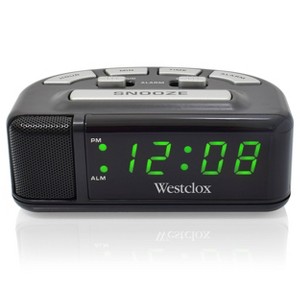
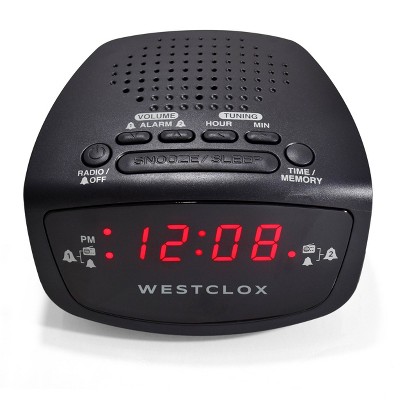
Digital Alarm Clock Black - Westclox
$10.00
In Stock
Eligible for registries and wish lists
About this item
Additional product information and recommendations
Frequently bought together





Guests also viewed
Related Categories
Guests are saying
The alarm clock has received mixed feedback from guests, with many expressing disappointment in its reliability and durability. While some appreciate its compact size and ease of use, others report issues with the alarm feature and display malfunctions. Guests have noted that the clock is affordable, but its performance may not meet expectations for long-term use. Overall, it may serve well for short-term needs but could fall short for those seeking a dependable alarm clock.
Summary created by AI from text of reviews reflecting recent feedback provided across different star ratings (includes incentivized reviews)
3.5 out of 5 stars with 266 reviews
design: 3.64 out of 5
quality: 2.48 out of 5
value: 2.87 out of 5
35% would recommend
87 recommendations
4 out of 5 stars
Thumbs down graphic, would not recommend
26 October, 2026
(no review title)
wroke me up
1 out of 5 stars
Thumbs down graphic, would not recommend
26 September, 2026
(no review title)
The green alarm light will turn off if the alarm has gone off or has been turned off. I missed two of the classes I was supposed to teach because the alarm never went off. This is the second time this has happened- the alarm is untrustworthy and cheap. I do not recommend.
1 out of 5 stars
Thumbs down graphic, would not recommend
25 September, 2026Verified purchase
Lasted less than 2 months
Westclox is the name I've been using for over 30 yrs, but within a month it began to display the time as 2727, which I changed twice. By the 2nd month the clock totally died and I bought a different brand. a small $10 loss, but huge disappointment with Westclox
1 out of 5 stars
Thumbs down graphic, would not recommend
20 September, 2026Verified purchase
Stopped Working
Lasted only one year just like other reviews here. Time started to elapse and number reading went out only showing partial time. Ugh!
2 out of 5 stars
Thumbs down graphic, would not recommend
3 September, 2026Verified purchase
Not worth it.
Stopped working after a year, despite being plugged in. Wouldn't keep the time so alarm didn't go off and couldn't see the numbers anymore.
2 out of 5 stars
Thumbs down graphic, would not recommend
25 August, 2026
Deafly quiet
I do like the fact that this alarm will not stop until you hit the snooze button, but the box clearly says “super loud” my ceiling fan is louder than this thing. Obviously yes it’s an affordable alarm clock but please don’t advertise this as “super loud” if even my fridge is louder than the clock.
5 out of 5 stars
Thumbs up graphic, would recommend
24 August, 2026
(no review title)
Good alarm clock. Great price!
1 out of 5 stars
Thumbs down graphic, would not recommend
24 August, 2026Verified purchase
Just a clock
The alarm feature never worked. I tried multiple things to fix it but the alarm won’t go off.
5 out of 5 stars
14 August, 2026Verified purchase
(no review title)
I love this tiny clock. It is perfect for my bedroom. The green digits are different, yet cute.
5 out of 5 stars
Thumbs up graphic, would recommend
12 July, 2026Verified purchase
(no review title)
Easy to set up and very reasonable and light weight
5 out of 5 stars
Thumbs up graphic, would recommend
7 July, 2026Verified purchase
Realiable and loud!
Looks great and does the job. I rely on my clock to remind me to take my medicine The alarm was loud so I set it to soft which is much better for me. I have had this clock for a few years and decided to buy another.
1 out of 5 stars
Thumbs down graphic, would not recommend
2 July, 2026Verified purchase
cheap in every way
this alarm clock lasted less than one year
2 out of 5 stars
Thumbs down graphic, would not recommend
25 June, 2026
cheap and short-lived
bought in January 2025, died in May 2026
5 out of 5 stars
24 June, 2026Verified purchase
(no review title)
It’s was amazing
1 out of 5 stars
Thumbs down graphic, would not recommend
16 June, 2026Verified purchase
Dissapointed
Thought it would be perfect with a size but as soon as I got home, found out it happened, opened already and was broken
1 out of 5 stars
8 June, 2026Verified purchase
(no review title)
Digital display stopped working after 3 months
1 out of 5 stars
Thumbs down graphic, would not recommend
1 June, 2026
Quit working after 6 months
Display quit working after 6 months. Believe the bad reviews and save yourself $10.
1 out of 5 stars
11 May, 2026Verified purchase
Dont recommend
Unfortunately this broke after a week of use.
5 out of 5 stars
Thumbs up graphic, would recommend
19 April, 2026Verified purchase
Very Nice Clock
I love this clock and it is perfect for my bedroom. It is small but then again you can see it perfectly It is very simplified and that is what I like simplified things. I do not like instructions and this was so easy to get going and I highly recommend it.
1 out of 5 stars
12 April, 2026Verified purchase
(no review title)
Only had this little clock for less than a month and already it is broken. Would not recommend this product. When you only pay $10 you can expect trash. Sorry Westclox use to have good products.