New ArrivalsEasterClothing, Shoes & AccessoriesHomeKitchen & DiningOutdoor Living & GardenFurnitureGroceryHousehold EssentialsBabyBeautyPersonal CareHealthWellnessBackpacks & LuggageSports & OutdoorsToysElectronicsVideo GamesMovies, Music & BooksSchool & Office SuppliesParty SuppliesGift IdeasGift CardsPetsUlta Beauty at TargetShop by CommunityTarget OpticalDealsClearanceTarget New ArrivalsRoller Rabbit x TargetEasterHome Decor Ideas & TrendsTop DealsTarget Circle DealsWeekly AdShop Order PickupShop Same Day DeliveryRegistryRedCardTarget CircleFind Stores
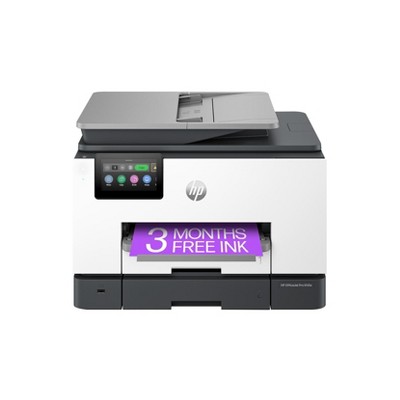
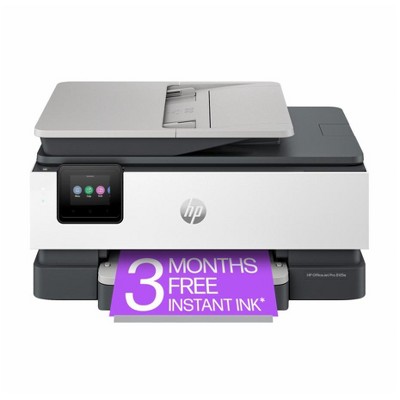
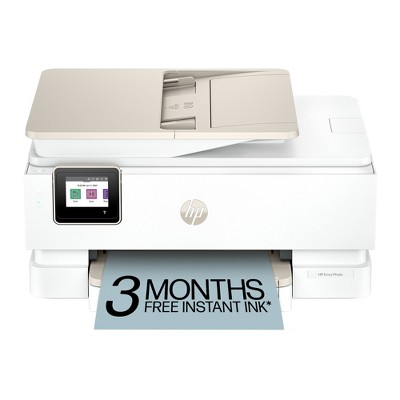
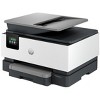
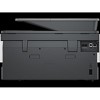
HP OfficeJet Pro 9125e All-in-One Printer with 3 Months of Instant Ink for free with HP+, AI-enabled - 2 of 4HP OfficeJet Pro 9125e All-in-One Printer with 3 Months of Instant Ink for free with HP+, AI-enabled - 3 of 4HP OfficeJet Pro 9125e All-in-One Printer with 3 Months of Instant Ink for free with HP+, AI-enabled - 4 of 4
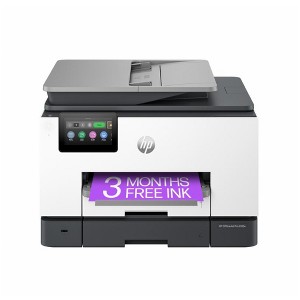
HP OfficeJet Pro 9125e All-in-One Printer with 3 Months of Instant Ink for free with HP+, AI-enabled - 1 of 4

HP OfficeJet Pro 9125e All-in-One Printer with 3 Months of Instant Ink for free with HP+, AI-enabled

$219.99 reg $309.99
Sale save $90.00 (29% off)

In Stock

Free & easy returns

Free & easy returns

Return this item by mail or in store within 30 days for a full refund.
Sold & shipped by HP Official Store
Eligible for registries and wish lists

About this item

Highlights

  • Supercharged performance for home or small business
  • Fast color print, copy, scan, fax, 2-sided prints, 2-sided scan, mobile/wireless/ethernet
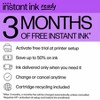
  • Includes 3 months of Instant Ink for free with HP+
  • HP's most reliable wi-fi and HP Wolf Pro Security

Description

Overview - Say hello to the professional color inkjet printer for your small office from America’s most trusted printer brand, paired with the easiest-to-use print app. Enjoy easy printing designed to make you succeed at work. Fax included. - For small and medium businesses that want a professional color inkjet printer that helps their business grow and keeps disruptions to a minimum. - This printer is intended to work only with cartridges that have a new or reused HP chip, and it uses dynamic security measures to block cartridges using a non-HP chip. Periodic firmware updates will maintain the effectiveness of these measures and block cartridges that previously worked. A reused HP chip enables the use of reused, remanufactured, and refilled cartridges. Features Empower your team with a productivity powerhouse - Always ready for high volumes, get an HP OfficeJet Pro printer equipped with a 250-page input tray. Our best technology to stay connected and secure - Stay connected with our most reliable Wi-Fi® - dual-band, self-healing - that automatically reconnects. Always be ready to print. Never run out of ink. - With an Instant Ink subscription, you can get ink delivered directly to your door before you run out. Driving innovation with 40% recycled plastic - Choose printers made with at least 40% recycled plastic. Compatible Supplies - HP 936 Black Original Ink Cartridge 4S6V2LN, HP 936 Cyan Original Ink Cartridge 4S6U9LN; HP 936 Magenta Original Ink Cartridge 4S6V0LN; HP 936 Yellow Original Ink Cartridge 4S6V1LN; HP EvoMore planned to be available April 2024: HP 936e EvoMore Black Original Ink Cartridge 4S6V6LN; HP 936e EvoMore Cyan Original Ink Cartridge 4S6V3LN; HP 936e EvoMore Magenta Original Ink Cartridge 4S6V4LN; HP 936e EvoMore Yellow Original Ink Cartridge 4S6V5LN Minimum system requirements - Windows 11, 10: 32-bit or 64-bit, 2 GB available hard disk space, Internet connection,Internet Explorer. What's in the box? - HP OfficeJet Pro 9125e AiO Printer; HP 936 Setup Black Ink Cartridge;HP 936 Setup Cyan Ink Cartridge;HP 936 Setup Magenta Ink Cartridge;HP 936 Setup Yellow Ink Cartridge;Regulatory Flyer;Ink Caution Flyer;Power Cord;Setup Poster;Reference Guide[For more information about fill and yield, ] Disclaimers - Based on 2022 Q4 shipments in the IDC Worldwide Quarterly Hardcopy Peripherals Tracker®, 2022 Q4 Release. Includes shipments of all printing devices (inkjet printers, laser printers, copiers and multifunction devices, including production units). - Compared to OEM printing apps for the majority of top-selling, network-capable inkjet/laser printers and all-in-ones for the home and office, priced ≤$450 USD. Printers selected by market share as reported by IDC Quarterly Hardcopy Peripherals Tracker – Final Historical CYQ1 2023. Claim based on research of printer manufacturer’s print apps and Keypoint Intelligence hands-on testing and study commissioned by HP, July 2023. Requires HP app download available at www.hp.com/go/mobileprinting. Certain features are available in English language only, and may vary by printer model/country, and between desktop/mobile applications. HP reserves the right to introduce charges for use of functionality facilitated by the HP app. Internet access required and may not be available in all countries. HP account required for full functionality. Fax capabilities are for sending a fax only. List of supported operating systems available in app stores. - HP OfficeJet Pro 9100 printer series has self-healing Wi-Fi and HP Wolf Pro Security, HP’s best and most reliable technologies to stay connected and secure. Internet access required and must be purchased separately. Wireless operations are compatible with 2.4 GHz and 5.0 GHz operations only. HP Security is now HP Wolf Security
Dimensions (Overall): 10.94 inches (H) x 13.48 inches (W) x 17.3 inches (D)
Weight: 20.48 pounds
B&W Print Speed: 22 pages per minute
Color Print Speed: 18 pages per minute
Electronics Condition: New
Compatible With: Up to 8.5" x 11" Documents
Maximum Resolution: 1200 x 1200 (Black and White)
Wireless Technology: Wi-Fi
Printer Ink Color: Multiple Colors
Ink Series: HP 93 series
Battery: No Battery Used
Warranty: Multiple Warranties and/or Time Frames Apply. To obtain a copy of the manufacturer's or supplier's warranty for this item prior to purchasing the item, please call Target Guest Services at 1-800-591-3869
TCIN: 91271160
UPC: 196337284807
Origin: imported
The above item details were provided by the Target Plus™ Partner. Target does not represent or warrant that this information is accurate or complete. On occasion, manufacturers may modify their items and update their labels.
We recommend that you do not rely solely on the information presented. If you have a specific question about this item, you may consult the item's label, contact the manufacturer directly or call Target Guest Services at 1-800-591-3869.
If the item details aren’t accurate or complete, we want to know about it.

Shipping details

Estimated ship dimensions: 12.8 inches length x 14.48 inches width x 11.94 inches height
Estimated ship weight: 24.24 pounds
item ships from third party seller: HP Official Store

Return details

This item can be returned to any Target store or Target.com.
This item must be returned within 30 days of the date it was purchased in store, delivered to the guest, delivered by a Shipt shopper, or picked up by the guest.
See the return policy for complete information.

Q: Does HP 9125e printer have a port for a USB thumb drive? (I want to save scanned documents to a thumb drive, print them, and affix wet signatures to printed docs)

submitted by Renee M - 2 years ago
  • A: Hi Renee M, thanks for reaching out about HP Inc. OfficeJet Pro 9125e All-in-One Printer with Bonus 3 Months of Instant Ink with HP Inc.+ Yes there is a USB port on the left side of the printer. Using this port you can save scanned documents to your USB Flash Drive as well as print Users can directly print files stored on a USB drive device. Additionally you can print TIFF, JPEG, PDF 1.7 and below, and XPS If you have any additional questions, we welcome you to contact MyTGTtech at 833-848-8324 every day, between 7am-11pm CST.

    submitted byJustin - 2 years ago
    Target expert support
  • A: Does HP 9125E printer have a ports for a USB thumb drive,save scanned documents to a thumb drive,print them,and affix wet signatures to printed docs

    submitted byLawrence - 1 year ago

Q: Can I print from my Apple device (iPhone or iPad) without having to go through an HP app? I think this feature is called Apple Air. I have it on my current older printer HP OfficeJet 5740.

submitted by GG - 2 years ago
  • A: Hi GG, thanks for reaching out about HP Inc. OfficeJet Pro 9125e All-in-One Printer with Bonus 3 Months of Instant Ink with HP Inc.+. Yes you can print via apple iPad and iPhones via the Apple AirPrint. If you have any additional questions, we welcome you to contact MyTGTtech at 833-848-8324 every day, between 7am-11pm CST.

    submitted byMatt - 2 years ago
    Target expert support
  • A: Can I print from my apple device(iPhone or iPad)without going through aHP app

    submitted byLawrence - 1 year ago

Q: Can I print directly from my Android phone without a cable, using Bluetooth or WiFi?

submitted by Gloria - 6 days ago
  • A: Hi, thank you for reaching out about HP OfficeJet Pro 9125e All-in-One Printer with 3 Months of Instant Ink for free with HP+, AI-enabled. Yes, you can print directly from an Android phone to the HP OfficeJet Pro 9125e without a cable using Wi-Fi, Wi-Fi Direct, or the HP Smart app. The best methods include using the HP Smart app for network printing or enabling Wi-Fi Direct on the printer panel for a direct, router-free connection. If you have any additional questions, we welcome you to contact MyTGTtech at 833-848-8324 every day, between 7am-11pm CST.

    submitted byMatt - 5 days ago
    Target expert support

Q: Can I print from my computer to the copier. Not wifi. Using a cord.

submitted by Karla - 3 months ago
  • A: Hi, thank you for reaching out about HP OfficeJet Pro 9125e All-in-One Printer with 3 Months of Instant Ink for free with HP+, AI-enabled. Yes, you can print from your computer to the HP OfficeJet Pro 9125e using a USB cable instead of Wi-Fi; just connect the cable from your PC to the printer's USB port and install the necessary drivers. If you have any additional questions, we welcome you to contact MyTGTtech at 833-848-8324 every day, between 7am-11pm CST.

    submitted byMatt - 3 months ago
    Target expert support

Q: Can the 9125e do two sided printing? Thanks.

submitted by Dan - 5 months ago
  • A: Hi, thank you for reaching out about HP OfficeJet Pro 9125e All-in-One Printer with 3 Months of Instant Ink for free with HP+, AI-enabled. Yes, the HP OfficeJet Pro 9125e supports automatic two-sided (duplex) printing. This feature allows the printer to automatically print on both sides of the paper to help save paper and increase efficiency. If you have any additional questions, we welcome you to contact MyTGTtech at 833-848-8324 every day, between 7am-11pm CST.

    submitted byMatt - 5 months ago
    Target expert support

Q: Does this printer have a cable connection to the printer?

submitted by Bill - 5 months ago
  • A: Hi, thanks for reaching out about HP OfficeJet Pro 9125e All-in-One Printer with 3 Months of Instant Ink for free with HP+, AI-enabled This printer does not come with a USB cable included but you are able to use a USB cable from the printer to the computer. The items included with this printer are: HP OfficeJet Pro 9125e All-in-One Printer Original HP Setup Ink Cartridges: A full set of four initial ink cartridges (Black, Cyan, Magenta, Yellow) to start printing immediately. Power Cord: The necessary cable to plug the printer into a wall outlet. Setup Poster/Reference Guide: Quick start guides and documentation. Regulatory Flyers/Ink Caution Flyers If you have any additional questions, we welcome you to contact MyTGTtech at 833-848-8324 every day, between 7am-11pm CST.

    submitted byMike - 5 months ago
    Target expert support

Q: Do you have to have a phone land line to use fax feature?

submitted by KHR - 5 months ago
  • A: Hi, thank you for reaching out about HP OfficeJet Pro 9125e All-in-One Printer with 3 Months of Instant Ink for free with HP+, AI-enabled. Yes, you need a landline to use the built-in fax feature of the HP OfficeJet Pro 9125e, as the printer is designed for traditional dial-up faxing. However, you can send faxes from a computer or mobile device using the HP Smart app's Mobile Fax feature, which does not require a physical phone line connected to the printer, but you still need an HP account to use it. If you have any additional questions, we welcome you to contact MyTGTtech at 833-848-8324 every day, between 7am-11pm CST.

    submitted byMatt - 5 months ago
    Target expert support

Q: what is the print speed per minute?

submitted by dap - 10 months ago
  • A: Hi dap, thanks for reaching out about HP Inc. OfficeJet Pro 9125e All-in-One Printer with 3 Months of Instant Ink for free with HP Inc.+. HP provide the following print speends on their site. Print Speed - Black (ISO, laser comparable) Up to 22 ppm Print Speed - Color (ISO, laser comparable) Up to 18 ppm Print Speed - Black (draft) Up to 32 ppm Print Speed - Color (draft) Up to 32 ppm Print Speed - Black (normal) Up to 22 ppm Print speed - Color (normal) Up to 18 ppm First page out (ready) black As fast as 10 sec First page out (ready) color As fast as 11 sec If you have any additional questions, we welcome you to contact MyTGTtech at 833-848-8324 every day, between 7am-11pm CST.

    submitted byMatt - 10 months ago
    Target expert support

Q: Can you receive faxes as well as sending

submitted by Sheila - 1 year ago
  • A: Hi Sheila, thanks for reaching out about HP Inc. OfficeJet Pro 9125e All-in-One Printer with Bonus 3 Months of Instant Ink with HP Inc.+. Yes, you can send and receive faxes. Please review the manual for steps on how, link below. https://kaas.hpcloud.hp.com/pdf-public/pdf_6212888_en-US-1.pdf If you have any additional questions, we welcome you to contact MyTGTtech at 833-848-8324 every day, between 7am-11pm CST.

    submitted byMatt - 1 year ago
    Target expert support

Q: Does this scan in color copies?

submitted by Kimmie jj - 1 year ago
  • A: Hi Kimmie jj, thanks for reaching out about HP Inc. OfficeJet Pro 9125e All-in-One Printer with Bonus 3 Months of Instant Ink with HP Inc.+. Yes, this will scan and copy in color. If you have any additional questions, we welcome you to contact MyTGTtech at 833-848-8324 every day, between 7am-11pm CST.

    submitted byMatt - 1 year ago
    Target expert support

Additional product information and recommendations

Guests are saying

The HP OfficeJet Pro 9125e is a versatile all-in-one printer that excels in printing, scanning, and copying, making it ideal for home offices and personal use. Guests appreciate its fast printing speed, excellent print quality, and user-friendly setup process. While some have experienced connectivity issues and setup challenges, many find the wireless capabilities and HP Smart app features to be game-changers. Overall, it offers great value for its multifunctional capabilities.
    Summary created by AI from text of reviews reflecting recent feedback provided across different star ratings (includes incentivized reviews)
    4.0 out of 5 stars with 578 reviews
    quality: 4.33 out of 5
    value: 4.67 out of 5
    83% would recommend
    6 recommendations
    1 out of 5 stars
    29 March, 2026
    originally posted on store.hp.com
    Image

    Printer

    Worked for a week then have not been able to get it to print after following all recommendations
    Warren H
    Did you find this review helpful?
    3 out of 5 stars
    19 March, 2026
    originally posted on hp.com
    Image

    Try another printer to purchase

    I have been having printing issues from the start. Some days it prints without having to shut everything down and some days it does not. Sometimes the screen states that "internet connection is unavailable" The connection is the same everyday and nothing changes, except I cannot print on some days.
    Mrs. Randle
    Did you find this review helpful?
    3 out of 5 stars
    16 March, 2026
    originally posted on hp.com
    Image

    Scanning and Printing problem

    The scanning function is not stable. Sometime I could not use scanning by using printer directly. Then, I need to use through computer. Also, when printing PDF file, there are so many problem on it.
    Did you find this review helpful?
    2 out of 5 stars
    8 March, 2026
    originally posted on hp.com
    Image

    Subpar

    I have had HP printers in the past and I regret purchasing this model. This is subpar. The paper tray does not extend so it does not hold the paper coming off the printer. Terrible.
    Below Par
    Did you find this review helpful?
    5 out of 5 stars
    28 February, 2026
    originally posted on store.hp.com
    Image

    Small business/schoolwork documents great!

    Excellent for small business or home printing. Not great photo quality but documents are adequate.
    A J W
    Did you find this review helpful?
    5 out of 5 stars
    28 February, 2026
    originally posted on store.hp.com
    Image

    HP Wins Again

    Easy to set up, good performance and print quality, happy customer.
    Inky
    Did you find this review helpful?
    5 out of 5 stars
    22 February, 2026
    originally posted on hp.com
    Image

    Best purchase ever

    Good product
    Yudith
    Did you find this review helpful?
    5 out of 5 stars
    Thumbs up graphic, would recommend
    19 February, 2026Verified purchase

    (no review title)

    Had to purchase a new one because someone messed up the one I already had. Keep constantly messing with my printers.
    Roosalyn Felecia
    quality: 5 out of 5
    value: 5 out of 5
    Did you find this review helpful?
    2 out of 5 stars
    8 February, 2026
    originally posted on hp.com
    Image

    Stupid Ink System

    This printer comes with new ink cartridges. HP enrolls the buyer in an ink replenishment program and immediately sends replacement cartridges before I have come anywhere near using the original supply.
    Did you find this review helpful?
    5 out of 5 stars
    Thumbs up graphic, would recommend
    5 February, 2026Verified purchase

    Great little printer

    Printer is great, its just a nightmare dealing with HP because I got 1 and had to return it because the black cartridge wouldn't respond to the printer and HP couldn't figure it out at the moment, so I ordered another one and it did the same thing, so finally HP sent another Black cartridge and at first it didn't work, had to call HP back, and finally got someone that knew or was able to figure out how to get the new cartridge to connect to the printer.. 😡 But after all the hassles, the printer itself works great.!
    Lori
    quality: 4 out of 5
    value: 5 out of 5
    Did you find this review helpful?
    5 out of 5 stars
    2 February, 2026
    originally posted on store.hp.com
    Image

    LinuxMint 22 Install

    It took a bit of time to get it working, however, as it for LinuxMint 22, I expected some tweaks needed.
    Daffy Lnx
    Did you find this review helpful?
    5 out of 5 stars
    31 January, 2026
    originally posted on hp.com
    Image

    Excellent printer

    Ouality printer
    Concumer x
    Did you find this review helpful?
    5 out of 5 stars
    30 January, 2026
    originally posted on hp.com
    Image

    Very Good Quality

    I only purchase HP products. This is a great printer, yet it was not that easy to set up and connect to my network. The print quality is excellent.
    Did you find this review helpful?
    4 out of 5 stars
    22 January, 2026
    originally posted on hp.com
    Image

    Great Printer 🖨

    Great Priner : Easy to set up and fast
    Sage
    Did you find this review helpful?
    5 out of 5 stars
    14 January, 2026
    originally posted on hp.com
    Image

    Fast & Accurate

    This printer is incredibly fast & has virtually no defects. My previous HP Smart Tank 7602 was slow, had fewer functions and almost a 23% defect rate. I wouldn't recommend that printer to anyone except a very casual user. If you want a printer that meets the needs of someone in business or community service, I'd highly recommend this one.
    Guy R Jones
    Did you find this review helpful?
    5 out of 5 stars
    12 January, 2026
    originally posted on hp.com
    Image

    Fantastic printer - Huge upgrade

    Love this printer, it was an excellent update to our previous printer HP8012. It’s so much quicker at printing, the printing quality is far superior & ink cartridge wise, they last ages. 11/10
    JosephVIP
    Did you find this review helpful?
    3 out of 5 stars
    12 January, 2026
    originally posted on hp.com
    Image

    HP Office Jet Pro 9125e

    I struggled to get the printer set up and keep it set up. I don't like that you cannot have it set up with both ether-net and wireless. I don't like that there was very little information in the package about how to set it up. That shows how cheap HP is getting.
    Did you find this review helpful?
    4 out of 5 stars
    11 January, 2026
    originally posted on hp.com
    Image

    My Initial Thoughts On My New HP OfficeJet Pro 9125e Printer

    To the point - overall, my new OfficePro 9125e printer is a good replacement for my previous HP OfficeJet Pro 6978. On the whole, I am satisfied with it. I had one or two of my apps have some initial trouble properly connecting to the printer but with a little help from one of the AI apps, I was able to get this resolved. My biggest complaints deal with the front panel display and printing envelopes. Regarding the display, I have found typing in alphanumeric characters is a bit difficult because the characters are small and your finger position has to be fairly precise. This, however, is not a show stopper for me as I seldom have to do this. I am disappointed that HP does not allow some customization of the front panel functions through the computer app. Having this ability would allow me to have most-used functions where I can most easily get to them. Also, the printer only has one tray so when you want to print an envelope you have to swap out paper with an envelope. This is not a problem as I had to do this with my previous printer. What is a bit more cumbersome is that apparently even if you specify say a #10 envelope in the print settings on your software (such as Microsoft Word), you still have to tell the printer you are using a #10 envelope on the front panel and as I mentioned, the front panel is not customizable so you have to go 3 button presses down into the menu to select the #10 envelope then when you are finished, you have reverse this to return to normal pages. Again, this is not a show-stopper for me since I rarely have to print onto envelopes but I'm again disappointed that HP doesn't make printing envelopes a bit easier. Finally, I obviously cannot comment on long-term reliability as I have had this printer for less than two months but hopefully, with regular maintenance, it will perform as expected for several years.
    kgrizzaffi
    Did you find this review helpful?
    4 out of 5 stars
    11 January, 2026
    originally posted on store.hp.com
    Image

    Useful but unwieldy

    It gets the printing done, with a lag to start, and then, parts of the printing are cut off at the side, or top, when the paper comes out of the printer. There must be something wrong with the way the paper is aligned.
    Bell
    Did you find this review helpful?
    3 out of 5 stars
    7 January, 2026
    originally posted on hp.com
    Image

    I'm having trouble with the software app on my tablet.

    It took me a month to get the software app to work on my tablet. I had to program the printer with my cell phone.
    Did you find this review helpful?

    Get top deals, latest trends, and more.

    Privacy policy

    Footer

    About Us

    About TargetCareersNews & BlogTarget BrandsBullseye ShopSustainability & GovernancePress CenterAdvertise with UsInvestorsAffiliates & PartnersSuppliersTargetPlus

    Help

    Target HelpReturnsTrack OrdersRecallsContact UsFeedbackAccessibilitySecurity & FraudTeam Member ServicesLegal & Privacy

    Stores

    Find a StoreClinicPharmacyTarget OpticalMore In-Store Services

    Services

    Target Circle™Target Circle™ CardTarget Circle 360™Target AppRegistrySame Day DeliveryOrder PickupDrive UpFree 2-Day ShippingShipping & DeliveryMore Services
    PinterestFacebookInstagramXYoutubeTiktokTermsCA Supply ChainPrivacy PolicyCA Privacy RightsYour Privacy ChoicesInterest Based AdsHealth Privacy Policy